第五章: 核心工具深度剖析
源码版本: Claude Code v2.1.88 源码路径:
src/src/tools/阅读时间: 约 45 分钟
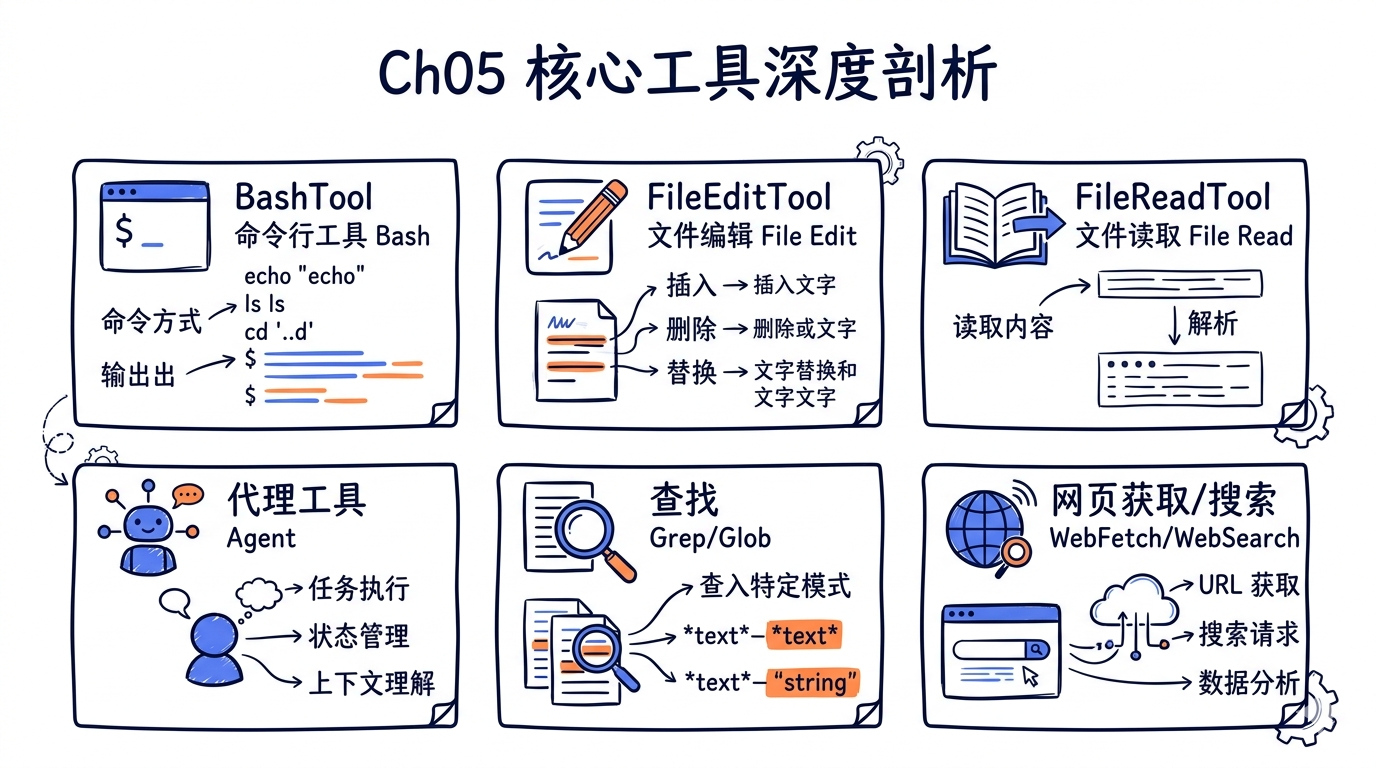
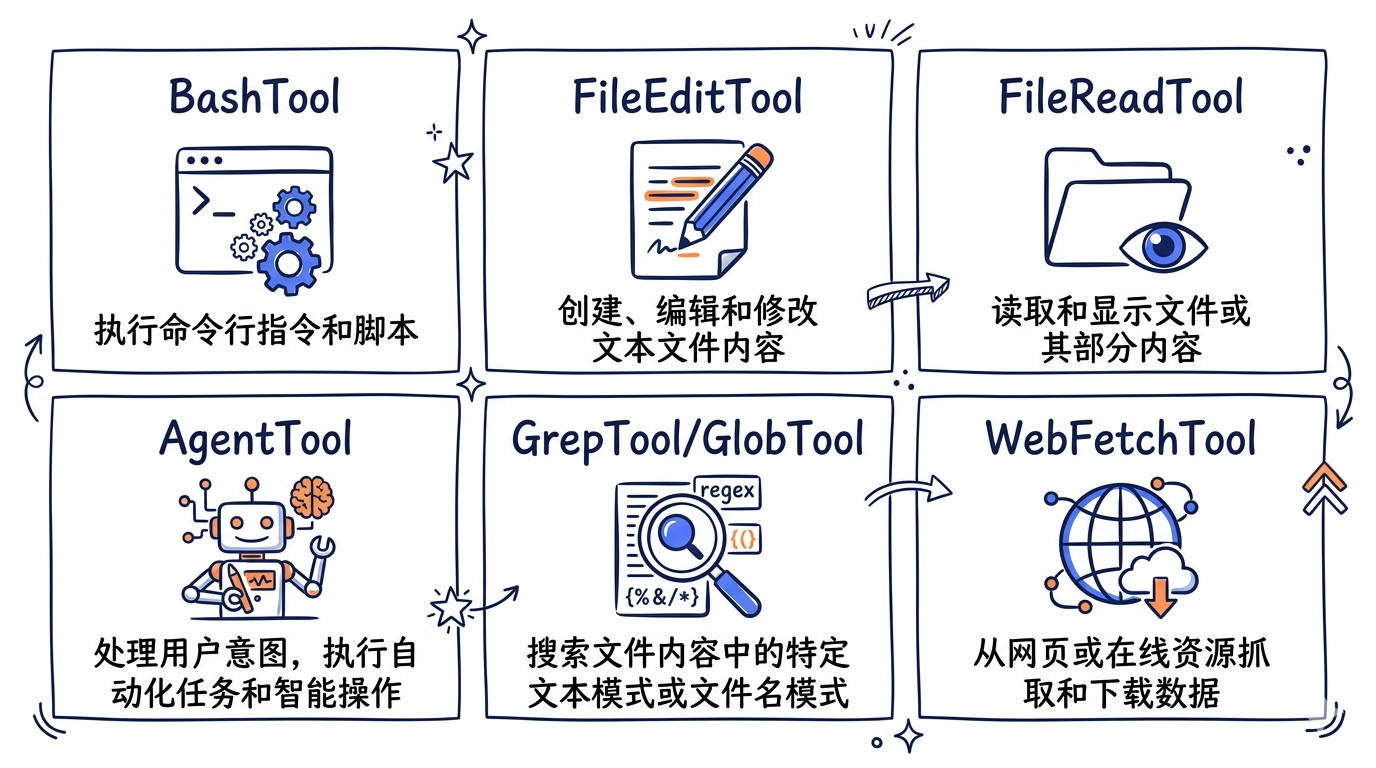
前面四章我们走通了 CLI 启动、Agent Loop、对话上下文的完整链路。但真正让 AI 能”动手做事”的,是挂载在 Agent Loop 上的工具系统。Claude Code 内置了二十余种工具,其中六类是日常使用频率最高的核心工具。本章将逐一拆解它们的源码实现,带你看清每一行代码背后的设计决策。
5.1 BashTool: 最强大也最危险的工具
BashTool 是 Claude Code 中代码量最大、安全机制最复杂的单一工具。它允许 AI 在用户机器上执行任意 shell 命令——这既是它强大的根源,也是安全风险的主要来源。
5.1.1 文件结构一览
tools/BashTool/
├── BashTool.tsx              # 主文件,核心逻辑 (~900行)
├── prompt.ts                 # System prompt 生成
├── bashSecurity.ts           # 安全校验引擎 (~800行)
├── bashPermissions.ts        # 权限规则匹配
├── bashCommandHelpers.ts     # 复合命令拆分与校验
├── shouldUseSandbox.ts       # Sandbox 判定逻辑
├── destructiveCommandWarning.ts # 危险命令警告
├── commandSemantics.ts       # Exit code 语义解释
├── sedEditParser.ts          # sed 命令特殊处理
├── readOnlyValidation.ts     # 只读模式校验
├── modeValidation.ts         # 模式级别校验
├── pathValidation.ts         # 路径安全校验
└── toolName.ts               # 工具名常量
5.1.2 Input Schema:精心设计的参数
BashTool 的输入 schema 定义在 BashTool.tsx 中,看似简单,但每个字段都有深意:
// 文件: src/src/tools/BashTool/BashTool.tsx (L227-L258)
const fullInputSchema = lazySchema(() => z.strictObject({
  command: z.string().describe('The command to execute'),
  timeout: semanticNumber(z.number().optional())
    .describe(`Optional timeout in milliseconds (max ${getMaxTimeoutMs()})`),
  description: z.string().optional()
    .describe(`Clear, concise description of what this command does...`),
  run_in_background: semanticBoolean(z.boolean().optional())
    .describe(`Set to true to run this command in the background.`),
  dangerouslyDisableSandbox: semanticBoolean(z.boolean().optional())
    .describe('Set this to true to dangerously override sandbox mode...'),
  _simulatedSedEdit: z.object({
    filePath: z.string(),
    newContent: z.string()
  }).optional().describe('Internal: pre-computed sed edit result from preview')
}));
这里有几个值得注意的设计:
semanticNumber/semanticBoolean: 这不是普通的 Zod type。Claude 模型有时会把 boolean 输出为"true"(字符串),这两个 wrapper 能容错解析。_simulatedSedEdit: 以下划线开头的内部字段,永远不会暴露给模型。它在用户通过 permission dialog 预览 sed 编辑后注入,确保”所见即所得”。description: 不是给人看的——它出现在 UI 的权限确认弹窗中,帮助用户理解这个命令在做什么。
关键安全措施:_simulatedSedEdit 字段从面向模型的 schema 中移除:
// 文件: src/src/tools/BashTool/BashTool.tsx (L254-L259)
const inputSchema = lazySchema(() => isBackgroundTasksDisabled
  ? fullInputSchema().omit({
      run_in_background: true,
      _simulatedSedEdit: true
    })
  : fullInputSchema().omit({
      _simulatedSedEdit: true
    })
);
如果将 _simulatedSedEdit 暴露给模型,模型就能用一个无害的 command 搭配一个恶意的 file write 来绕过 sandbox——这是一个典型的”安全边界不能泄露给不受信内部组件”的案例。
5.1.3 Sandbox 机制
Sandbox 是 BashTool 的核心安全层。shouldUseSandbox.ts 决定是否启用沙箱:
// 文件: src/src/tools/BashTool/shouldUseSandbox.ts (L130-L153)
export function shouldUseSandbox(input: Partial<SandboxInput>): boolean {
  if (!SandboxManager.isSandboxingEnabled()) {
    return false
  }
  // 用户显式关闭 + 策略允许
  if (input.dangerouslyDisableSandbox &&
      SandboxManager.areUnsandboxedCommandsAllowed()) {
    return false
  }
  if (!input.command) {
    return false
  }
  // 用户配置的排除命令(如 bazel、docker)
  if (containsExcludedCommand(input.command)) {
    return false
  }
  return true
}
排除命令的匹配逻辑处理复合命令(docker ps && curl evil.com),对每个子命令独立检查,防止恶意命令通过 && 搭便车:
// 文件: src/src/tools/BashTool/shouldUseSandbox.ts (L64-L69)
let subcommands: string[]
try {
  subcommands = splitCommand_DEPRECATED(command)
} catch {
  subcommands = [command]
}
Sandbox 的限制在 prompt 中以 JSON 格式告知模型,包含文件系统读写规则和网络规则。值得注意的一个优化:为了避免破坏跨用户的 prompt cache,系统把用户特定的临时目录(如 /private/tmp/claude-1001/)替换为 $TMPDIR:
// 文件: src/src/tools/BashTool/prompt.ts (L188-L191)
const claudeTempDir = getClaudeTempDir()
const normalizeAllowOnly = (paths: string[]): string[] =>
  [...new Set(paths)].map(p => (p === claudeTempDir ? '$TMPDIR' : p))
5.1.4 危险命令检测
destructiveCommandWarning.ts 是一个纯信息层——它不阻止命令执行,但在权限确认弹窗中显示警告:
// 文件: src/src/tools/BashTool/destructiveCommandWarning.ts (L12-L89)
const DESTRUCTIVE_PATTERNS: DestructivePattern[] = [
  // Git — 数据丢失
  { pattern: /\bgit\s+reset\s+--hard\b/,
    warning: 'Note: may discard uncommitted changes' },
  { pattern: /\bgit\s+push\b[^;&|\n]*[ \t](--force|--force-with-lease|-f)\b/,
    warning: 'Note: may overwrite remote history' },
  // 文件删除
  { pattern: /(^|[;&|\n]\s*)rm\s+-[a-zA-Z]*[rR][a-zA-Z]*f/,
    warning: 'Note: may recursively force-remove files' },
  // 数据库
  { pattern: /\b(DROP|TRUNCATE)\s+(TABLE|DATABASE|SCHEMA)\b/i,
    warning: 'Note: may drop or truncate database objects' },
  // 基础设施
  { pattern: /\bkubectl\s+delete\b/,
    warning: 'Note: may delete Kubernetes resources' },
  { pattern: /\bterraform\s+destroy\b/,
    warning: 'Note: may destroy Terraform infrastructure' },
];
注意正则表达式的精确性——git clean 的检测排除了 --dry-run 模式:
{ pattern: /\bgit\s+clean\b(?![^;&|\n]*(?:-[a-zA-Z]*n|--dry-run))[^;&|\n]*-[a-zA-Z]*f/,
  warning: 'Note: may permanently delete untracked files' },
5.1.5 安全校验引擎
bashSecurity.ts 是 BashTool 中最复杂的文件(超过 800 行)。它定义了一套全面的命令注入防御体系。以下是部分关键检测维度:
命令替换检测——阻止 $() 等 shell 元编程语法:
// 文件: src/src/tools/BashTool/bashSecurity.ts (L16-L41)
const COMMAND_SUBSTITUTION_PATTERNS = [
  { pattern: /<\(/, message: 'process substitution <()' },
  { pattern: />\(/, message: 'process substitution >()' },
  { pattern: /=\(/, message: 'Zsh process substitution =()' },
  { pattern: /\$\(/, message: '$() command substitution' },
  { pattern: /\$\{/, message: '${} parameter substitution' },
  { pattern: /\$\[/, message: '$[] legacy arithmetic expansion' },
];
Zsh 危险命令阻断——Claude Code 同时支持 bash 和 zsh,而 zsh 有独特的危险特性:
// 文件: src/src/tools/BashTool/bashSecurity.ts (L43-L74)
const ZSH_DANGEROUS_COMMANDS = new Set([
  'zmodload',   // 模块加载——通往 mapfile/sysopen/ztcp 的入口
  'emulate',    // 带 -c 时等同于 eval
  'sysopen',    // 精细文件 I/O (zsh/system)
  'syswrite',   // 文件描述符写入
  'zpty',       // 伪终端命令执行
  'ztcp',       // TCP 网络连接(可用于数据渗透)
  'zf_rm',      // 内建 rm,绕过 binary 检查
  'zf_mv',      // 内建 mv
  'zf_chmod',   // 内建 chmod
]);
系统对每条命令定义了唯一的数字 ID,用于日志追踪:
// 文件: src/src/tools/BashTool/bashSecurity.ts (L77-L101)
const BASH_SECURITY_CHECK_IDS = {
  INCOMPLETE_COMMANDS: 1,
  JQ_SYSTEM_FUNCTION: 2,
  OBFUSCATED_FLAGS: 4,
  SHELL_METACHARACTERS: 5,
  DANGEROUS_VARIABLES: 6,
  NEWLINES: 7,
  DANGEROUS_PATTERNS_COMMAND_SUBSTITUTION: 8,
  IFS_INJECTION: 11,
  CONTROL_CHARACTERS: 17,
  UNICODE_WHITESPACE: 18,
  // ...
} as const
5.1.6 Exit Code 语义解释
commandSemantics.ts 告诉 Agent Loop 不同命令的 exit code 含义。例如 grep 返回 1 只是”没找到”,不是错误:
// 文件: src/src/tools/BashTool/commandSemantics.ts (L31-L86)
const COMMAND_SEMANTICS: Map<string, CommandSemantic> = new Map([
  ['grep', (exitCode) => ({
    isError: exitCode >= 2,
    message: exitCode === 1 ? 'No matches found' : undefined,
  })],
  ['diff', (exitCode) => ({
    isError: exitCode >= 2,
    message: exitCode === 1 ? 'Files differ' : undefined,
  })],
  ['test', (exitCode) => ({
    isError: exitCode >= 2,
    message: exitCode === 1 ? 'Condition is false' : undefined,
  })],
]);
对于复合命令,系统提取最后一个命令的语义——因为在 shell 中,复合命令的 exit code 由最后一个命令决定。
5.1.7 复合命令安全检查
bashCommandHelpers.ts 处理管道和复合命令的安全校验。一个关键检查是防止跨 pipe segment 的 cd + git 攻击:
// 文件: src/src/tools/BashTool/bashCommandHelpers.ts (L49-L82)
// SECURITY: 检查跨 pipe segment 的 cd+git 模式
// 防止 bare repo fsmonitor bypass
{
  let hasCd = false
  let hasGit = false
  for (const segment of segments) {
    const subcommands = splitCommand_DEPRECATED(segment)
    for (const sub of subcommands) {
      if (checkers.isNormalizedCdCommand(sub.trim())) hasCd = true
      if (checkers.isNormalizedGitCommand(sub.trim())) hasGit = true
    }
  }
  if (hasCd && hasGit) {
    return {
      behavior: 'ask',
      decisionReason: {
        type: 'other',
        reason: 'Compound commands with cd and git require approval...',
      },
    }
  }
}
这防范的是一种真实攻击:通过 cd 进入一个恶意的 bare git repository,然后执行 git status——git 的 fsmonitor hook 会自动执行仓库中预设的恶意脚本。
5.2 FileEditTool: 精准的文本替换引擎
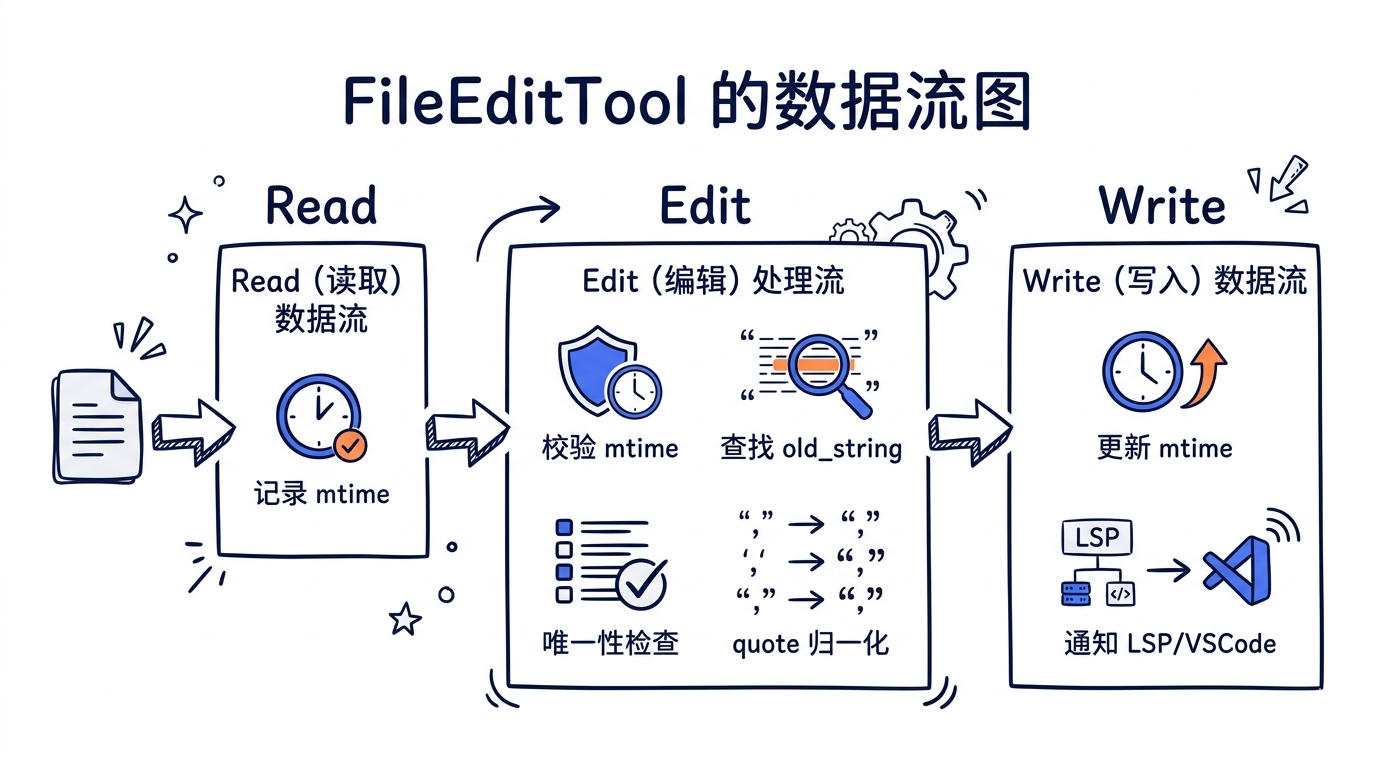
FileEditTool 实现了一种看似简单但细节丰富的编辑机制:old_string -> new_string 精确替换。
5.2.1 核心设计理念
为什么不用 diff/patch?为什么不用行号定位?选择 string replacement 有深层原因:
- 模型友好: LLM 天然擅长生成文本替换,不擅长生成精确行号偏移
- 无序依赖: 多个独立编辑不受顺序影响
- 唯一性约束: 强制
old_string在文件中唯一出现,避免模型编辑错误位置
5.2.2 唯一性校验
这是 FileEditTool 最核心的安全机制。在 validateInput 中:
// 文件: src/src/tools/FileEditTool/FileEditTool.ts (L329-L343)
const matches = file.split(actualOldString).length - 1

if (matches > 1 && !replace_all) {
  return {
    result: false,
    behavior: 'ask',
    message: `Found ${matches} matches of the string to replace,
      but replace_all is false. To replace all occurrences,
      set replace_all to true.`,
    errorCode: 9,
  }
}
当 old_string 出现多次时,工具不会静默选择第一个匹配,而是报错要求模型:要么提供更多上下文使匹配唯一,要么显式设置 replace_all: true。
5.2.3 Curly Quote 处理
很多文件使用 curly quotes(“ ”),但 LLM 只能输出 straight quotes(" ")。findActualString 函数解决了这个问题:
// 文件: src/src/tools/FileEditTool/utils.ts (L73-L93)
export function findActualString(
  fileContent: string,
  searchString: string,
): string | null {
  // 先尝试精确匹配
  if (fileContent.includes(searchString)) {
    return searchString
  }
  // 再尝试 quote 归一化匹配
  const normalizedSearch = normalizeQuotes(searchString)
  const normalizedFile = normalizeQuotes(fileContent)
  const searchIndex = normalizedFile.indexOf(normalizedSearch)
  if (searchIndex !== -1) {
    return fileContent.substring(
      searchIndex, searchIndex + searchString.length
    )
  }
  return null
}
配套地,当匹配成功后,preserveQuoteStyle 确保 new_string 也使用文件原有的 curly quote 风格——连缩写中的撇号(如 don’t)也能正确处理。
5.2.4 并发写入保护——乐观锁模式
FileEditTool 有一套精密的”读后写”保护机制,形成一个乐观锁:
// 文件: src/src/tools/FileEditTool/FileEditTool.ts (L274-L311)
// 步骤 1:检查文件是否已读取
const readTimestamp = toolUseContext.readFileState.get(fullFilePath)
if (!readTimestamp || readTimestamp.isPartialView) {
  return {
    result: false,
    message: 'File has not been read yet. Read it first.',
    errorCode: 6,
  }
}

// 步骤 2:检查文件是否在读取后被修改
if (readTimestamp) {
  const lastWriteTime = getFileModificationTime(fullFilePath)
  if (lastWriteTime > readTimestamp.timestamp) {
    const isFullRead = readTimestamp.offset === undefined &&
                       readTimestamp.limit === undefined
    // Windows 回退:mtime 变了但内容没变(云同步/杀毒软件场景)
    if (isFullRead && fileContent === readTimestamp.content) {
      // 安全,继续
    } else {
      return {
        result: false,
        message: 'File has been modified since read...',
        errorCode: 7,
      }
    }
  }
}
这个模式确保:Read -> Edit 之间如果文件被外部(linter、用户手动编辑、其他工具)修改,编辑会被拒绝。
5.2.5 De-sanitization 机制
Claude API 对某些 XML-like 标签会做安全化处理(如 <function_results> 变成 <fnr>),模型看到的是处理后的版本。FileEditTool 自动还原:
// 文件: src/src/tools/FileEditTool/utils.ts (L531-L550)
const DESANITIZATIONS: Record<string, string> = {
  '<fnr>': '<function_results>',
  '<n>':   '<name>',
  '</n>':  '</name>',
  '<e>':   '<error>',
  '</e>':  '</error>',
  '<s>':   '<system>',
  '</s>':  '</system>',
  '\n\nH:': '\n\nHuman:',
  '\n\nA:': '\n\nAssistant:',
}
当精确匹配失败时,系统尝试对 old_string 和 new_string 做反安全化处理,然后重新匹配。
5.3 FileReadTool: 多格式文件读取器
FileReadTool 不仅能读文本——它是一个支持文本、图片、PDF、Jupyter Notebook 的多格式读取器。
5.3.1 格式分发逻辑
callInner 函数根据文件扩展名分发到不同的处理路径:
// 文件: src/src/tools/FileReadTool/FileReadTool.ts (L804-L1017)
async function callInner(file_path, fullFilePath, resolvedFilePath,
  ext, offset, limit, pages, maxSizeBytes, maxTokens, ...) {
  // --- Notebook ---
  if (ext === 'ipynb') {
    const cells = await readNotebook(resolvedFilePath)
    // ...
  }
  // --- Image ---
  if (IMAGE_EXTENSIONS.has(ext)) {
    const data = await readImageWithTokenBudget(resolvedFilePath, maxTokens)
    // ...
  }
  // --- PDF ---
  if (isPDFExtension(ext)) {
    // 带 pages 参数 -> 提取指定页
    // 不带 pages -> 尝试完整读取或分页提取
    // ...
  }
  // --- Text file ---
  const { content, lineCount, totalLines, totalBytes, readBytes, mtimeMs } =
    await readFileInRange(resolvedFilePath, lineOffset, limit, ...)
  // ...
}
5.3.2 Token 预算控制
读取大文件是 LLM 工具的常见问题。FileReadTool 有一套双层限制系统:
// 文件: src/src/tools/FileReadTool/limits.ts (L1-L14)
// 两层限制:
// | limit         | default | cost          | on overflow     |
// |---------------|---------|---------------|-----------------|
// | maxSizeBytes  | 256 KB  | 1 stat        | throws pre-read |
// | maxTokens     | 25000   | API roundtrip | throws post-read|
maxSizeBytes 是快速检查(一次 stat 调用),maxTokens 是精确检查(需要 API 估算 token 数)。当文件过大时,抛出的错误消息引导模型使用 offset 和 limit 分段读取:
// 文件: src/src/tools/FileReadTool/FileReadTool.ts (L175-L185)
export class MaxFileReadTokenExceededError extends Error {
  constructor(public tokenCount: number, public maxTokens: number) {
    super(
      `File content (${tokenCount} tokens) exceeds maximum allowed ` +
      `tokens (${maxTokens}). Use offset and limit parameters to ` +
      `read specific portions of the file, or search for specific ` +
      `content instead of reading the whole file.`
    )
  }
}
5.3.3 图片 Token 预算压缩
图片读取有自己的 token 预算管理。系统先尝试标准 resize,如果超出预算再激进压缩:
// 文件: src/src/tools/FileReadTool/FileReadTool.ts (L1097-L1183)
export async function readImageWithTokenBudget(
  filePath: string,
  maxTokens: number,
): Promise<ImageResult> {
  const imageBuffer = await getFsImplementation().readFileBytes(filePath)
  // 标准 resize
  const resized = await maybeResizeAndDownsampleImageBuffer(
    imageBuffer, originalSize, detectedFormat
  )
  result = createImageResponse(resized.buffer, resized.mediaType, ...)

  // 检查是否超出 token 预算
  const estimatedTokens = Math.ceil(result.file.base64.length * 0.125)
  if (estimatedTokens > maxTokens) {
    // 激进压缩——仍然使用同一个 buffer(不重新读文件)
    const compressed = await compressImageBufferWithTokenLimit(
      imageBuffer, maxTokens, detectedMediaType
    )
    return { type: 'image', file: { base64: compressed.base64, ... } }
  }
  return result
}
关键细节:全程只读取一次文件。标准 resize 和激进压缩都基于同一个 imageBuffer。
5.3.4 读取去重优化
一个重要的性能优化:当模型重复读取同一文件的同一范围时,如果文件未变化,返回一个轻量 stub 而不是完整内容:
// 文件: src/src/tools/FileReadTool/FileReadTool.ts (L536-L573)
const existingState = dedupKillswitch
  ? undefined
  : readFileState.get(fullFilePath)

if (existingState && !existingState.isPartialView &&
    existingState.offset !== undefined) {
  const rangeMatch = existingState.offset === offset &&
                     existingState.limit === limit
  if (rangeMatch) {
    const mtimeMs = await getFileModificationTimeAsync(fullFilePath)
    if (mtimeMs === existingState.timestamp) {
      logEvent('tengu_file_read_dedup', { ... })
      return {
        data: {
          type: 'file_unchanged' as const,
          file: { filePath: file_path },
        },
      }
    }
  }
}
这个优化减少了约 18% 的重复 Read 调用的 token 消耗。只有来自 Read 工具的缓存条目(offset !== undefined)才参与去重——Edit/Write 的缓存条目反映的是编辑后的 mtime,用它去重会错误地指向编辑前的内容。
5.3.5 设备文件防护
一个容易被忽视的安全细节:阻止读取会导致挂起的设备文件:
// 文件: src/src/tools/FileReadTool/FileReadTool.ts (L98-L128)
const BLOCKED_DEVICE_PATHS = new Set([
  '/dev/zero',     // 无限输出
  '/dev/random',   // 无限输出
  '/dev/urandom',  // 无限输出
  '/dev/stdin',    // 阻塞等待输入
  '/dev/tty',      // 阻塞等待输入
  '/dev/console',  // 阻塞等待输入
  '/dev/fd/0',     // stdin 别名
  '/dev/fd/1',     // stdout 别名
  '/dev/fd/2',     // stderr 别名
]);
注意 /dev/null 不在列表中——读取它是安全的(返回空)。
5.3.6 恶意代码分析提醒
读取文件后,系统注入一段安全提醒到 tool result 中:
// 文件: src/src/tools/FileReadTool/FileReadTool.ts (L729-L730)
export const CYBER_RISK_MITIGATION_REMINDER =
  '\n\n<system-reminder>\nWhenever you read a file, you should consider ' +
  'whether it would be considered malware. You CAN and SHOULD provide ' +
  'analysis of malware, what it is doing. But you MUST refuse to improve ' +
  'or augment the code.\n</system-reminder>\n'
但对于最新的 claude-opus-4-6 模型,这个提醒被跳过——因为该模型已经内建了足够的安全判断能力:
const MITIGATION_EXEMPT_MODELS = new Set(['claude-opus-4-6'])
5.4 AgentTool: 子代理协调器
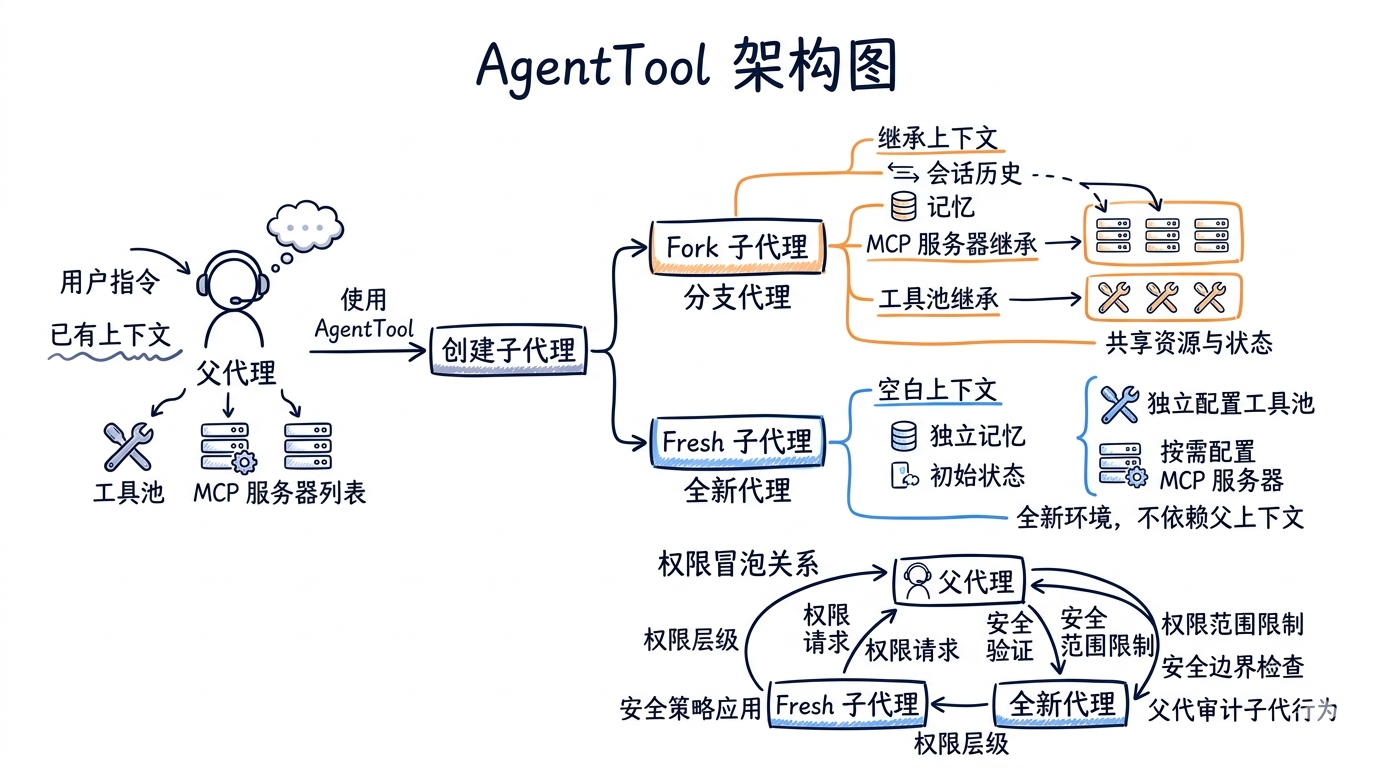
AgentTool 是 Claude Code 的”分身术”——它能启动独立的子代理来并行处理任务。这是整个工具系统中架构最复杂的部分。
5.4.1 Agent 类型体系
Claude Code 内置了多种 agent 类型:
// 文件: src/src/tools/AgentTool/builtInAgents.ts (L45-L72)
const agents: AgentDefinition[] = [
  GENERAL_PURPOSE_AGENT,    // 通用代理
  STATUSLINE_SETUP_AGENT,   // 状态栏配置
]

if (areExplorePlanAgentsEnabled()) {
  agents.push(EXPLORE_AGENT, PLAN_AGENT)  // 探索 + 规划代理
}

if (isNonSdkEntrypoint) {
  agents.push(CLAUDE_CODE_GUIDE_AGENT)  // 使用指南代理
}

// 验证代理(实验性)
if (feature('VERIFICATION_AGENT') && ...) {
  agents.push(VERIFICATION_AGENT)
}
除了内建 agent,用户和插件还可以通过 Markdown frontmatter 定义自定义 agent。
5.4.2 Fork Subagent:上下文继承
v2.1.88 引入了 Fork Subagent 机制——子代理可以继承父代理的完整对话上下文:
// 文件: src/src/tools/AgentTool/forkSubagent.ts (L31-L39)
export function isForkSubagentEnabled(): boolean {
  if (feature('FORK_SUBAGENT')) {
    if (isCoordinatorMode()) return false      // 与 coordinator 互斥
    if (getIsNonInteractiveSession()) return false  // SDK 模式不支持
    return true
  }
  return false
}
Fork 子代理的核心优势是prompt cache 共享。因为它继承了父代理的系统 prompt 和工具定义,API 请求的前缀字节完全相同,可以命中 Anthropic API 的 prompt cache:
// 文件: src/src/tools/AgentTool/forkSubagent.ts (L60-L71)
export const FORK_AGENT = {
  agentType: FORK_SUBAGENT_TYPE,
  tools: ['*'],           // 继承父代理的全部工具
  maxTurns: 200,
  model: 'inherit',       // 继承父代理的模型
  permissionMode: 'bubble', // 权限请求冒泡到父终端
  source: 'built-in',
  getSystemPrompt: () => '',  // 不用——直接用父代理的
} satisfies BuiltInAgentDefinition
5.4.3 防止递归 fork
Fork 子代理保留了 Agent tool 在工具池中(为了 cache 一致性),但通过检测对话历史中的特殊标签来阻止递归 fork:
// 文件: src/src/tools/AgentTool/forkSubagent.ts (L78-L89)
export function isInForkChild(messages: MessageType[]): boolean {
  return messages.some(m => {
    if (m.type !== 'user') return false
    const content = m.message.content
    if (!Array.isArray(content)) return false
    return content.some(
      block => block.type === 'text' &&
        block.text.includes(`<${FORK_BOILERPLATE_TAG}>`)
    )
  })
}
5.4.4 子代理的生命周期管理
runAgent.ts 是子代理的核心运行逻辑。它处理了大量生命周期细节:
创建阶段——构建隔离的上下文:
// 文件: src/src/tools/AgentTool/runAgent.ts (L375-L379)
const agentReadFileState =
  forkContextMessages !== undefined
    ? cloneFileStateCache(toolUseContext.readFileState)
    : createFileStateCacheWithSizeLimit(READ_FILE_STATE_CACHE_SIZE)
Fork 子代理克隆父代理的文件状态缓存,普通子代理创建空缓存。
销毁阶段——全面的资源清理:
// 文件: src/src/tools/AgentTool/runAgent.ts (L817-L858)
finally {
  await mcpCleanup()                    // 清理 MCP 服务器连接
  clearSessionHooks(rootSetAppState, agentId)  // 清理 session hooks
  cleanupAgentTracking(agentId)         // 清理 prompt cache 追踪
  agentToolUseContext.readFileState.clear()  // 释放文件状态缓存
  initialMessages.length = 0            // 释放消息数组
  unregisterPerfettoAgent(agentId)      // 释放 Perfetto 追踪
  clearAgentTranscriptSubdir(agentId)   // 清理 transcript 目录
  // 清理 todos(防止每个子代理都留下空 entry)
  rootSetAppState(prev => {
    if (!(agentId in prev.todos)) return prev
    const { [agentId]: _removed, ...todos } = prev.todos
    return { ...prev, todos }
  })
  // 杀死子代理启动的后台 bash 任务
  killShellTasksForAgent(agentId, ...)
}
特别值得注意的是 todos 清理:每个使用了 TodoWrite 的子代理会在 AppState.todos 中留下一个 key。即使 todo 列表为空,key 本身也是内存泄漏。大型会话可能启动数百个子代理,这些孤儿 key 会逐渐累积。
5.4.5 MCP 服务器继承
子代理可以在 frontmatter 中声明自己的 MCP 服务器,与父代理的服务器合并使用:
// 文件: src/src/tools/AgentTool/runAgent.ts (L95-L218)
async function initializeAgentMcpServers(
  agentDefinition: AgentDefinition,
  parentClients: MCPServerConnection[],
) {
  for (const spec of agentDefinition.mcpServers) {
    if (typeof spec === 'string') {
      // 引用已有服务器——共享连接
      config = getMcpConfigByName(spec)
    } else {
      // 内联定义——创建新连接,子代理结束时清理
      isNewlyCreated = true
    }
  }
  // 返回合并后的客户端列表
  return {
    clients: [...parentClients, ...agentClients],
    cleanup: async () => {
      // 只清理新创建的,不清理共享的
      for (const client of newlyCreatedClients) { ... }
    },
  }
}
5.5 GrepTool 与 GlobTool: 高效搜索组合
5.5.1 GrepTool:ripgrep 的智能封装
GrepTool 不是简单地调用 ripgrep——它在上层增加了大量智能处理。
三种输出模式:
// 文件: src/src/tools/GrepTool/GrepTool.ts (L55-L58)
output_mode: z.enum(['content', 'files_with_matches', 'count'])
  .optional()
  .describe('Output mode: "content" shows matching lines, ' +
    '"files_with_matches" shows file paths, "count" shows match counts.')
结果分页——默认限制 250 条结果,防止 context 膨胀:
// 文件: src/src/tools/GrepTool/GrepTool.ts (L108-L128)
const DEFAULT_HEAD_LIMIT = 250

function applyHeadLimit<T>(
  items: T[],
  limit: number | undefined,
  offset: number = 0,
): { items: T[]; appliedLimit: number | undefined } {
  // 显式传 0 = 无限(转义口)
  if (limit === 0) {
    return { items: items.slice(offset), appliedLimit: undefined }
  }
  const effectiveLimit = limit ?? DEFAULT_HEAD_LIMIT
  const sliced = items.slice(offset, offset + effectiveLimit)
  // 只有真正发生截断时才报告 appliedLimit
  const wasTruncated = items.length - offset > effectiveLimit
  return {
    items: sliced,
    appliedLimit: wasTruncated ? effectiveLimit : undefined,
  }
}
版本控制目录排除:
// 文件: src/src/tools/GrepTool/GrepTool.ts (L95-L103)
const VCS_DIRECTORIES_TO_EXCLUDE = [
  '.git', '.svn', '.hg', '.bzr', '.jj', '.sl',
] as const
结果按修改时间排序——最近修改的文件排在前面,使用 Promise.allSettled 确保单个文件 stat 失败不会影响整体结果:
// 文件: src/src/tools/GrepTool/GrepTool.ts (L529-L553)
const stats = await Promise.allSettled(
  results.map(_ => getFsImplementation().stat(_))
)
const sortedMatches = results
  .map((_, i) => {
    const r = stats[i]!
    return [_, r.status === 'fulfilled' ? (r.value.mtimeMs ?? 0) : 0]
  })
  .sort((a, b) => b[1] - a[1])  // 最近修改在前
  .map(_ => _[0])
路径压缩——所有输出路径自动转为相对路径,节省 token:
// 文件: src/src/tools/GrepTool/GrepTool.ts (L563)
const relativeMatches = finalMatches.map(toRelativePath)
5.5.2 GlobTool:文件名模式匹配
GlobTool 相对简单,核心是对底层 glob 库的封装,加上路径校验和结果限制:
// 文件: src/src/tools/GlobTool/GlobTool.ts (L154-L176)
async call(input, { abortController, getAppState, globLimits }) {
  const start = Date.now()
  const appState = getAppState()
  const limit = globLimits?.maxResults ?? 100  // 默认最多 100 个文件
  const { files, truncated } = await glob(
    input.pattern,
    GlobTool.getPath(input),
    { limit, offset: 0 },
    abortController.signal,
    appState.toolPermissionContext,
  )
  const filenames = files.map(toRelativePath)
  return {
    data: {
      filenames,
      durationMs: Date.now() - start,
      numFiles: filenames.length,
      truncated,
    },
  }
}
当结果被截断时,提示模型缩小搜索范围:
// 文件: src/src/tools/GlobTool/GlobTool.ts (L190-L195)
content: [
  ...output.filenames,
  ...(output.truncated
    ? ['(Results are truncated. Consider using a more specific ' +
       'path or pattern.)']
    : []),
].join('\n')
两个工具都标记了 isConcurrencySafe: true 和 isReadOnly: true,意味着它们可以与其他工具并行执行,不会产生副作用。
5.6 WebFetchTool 与 WebSearchTool: 联网能力
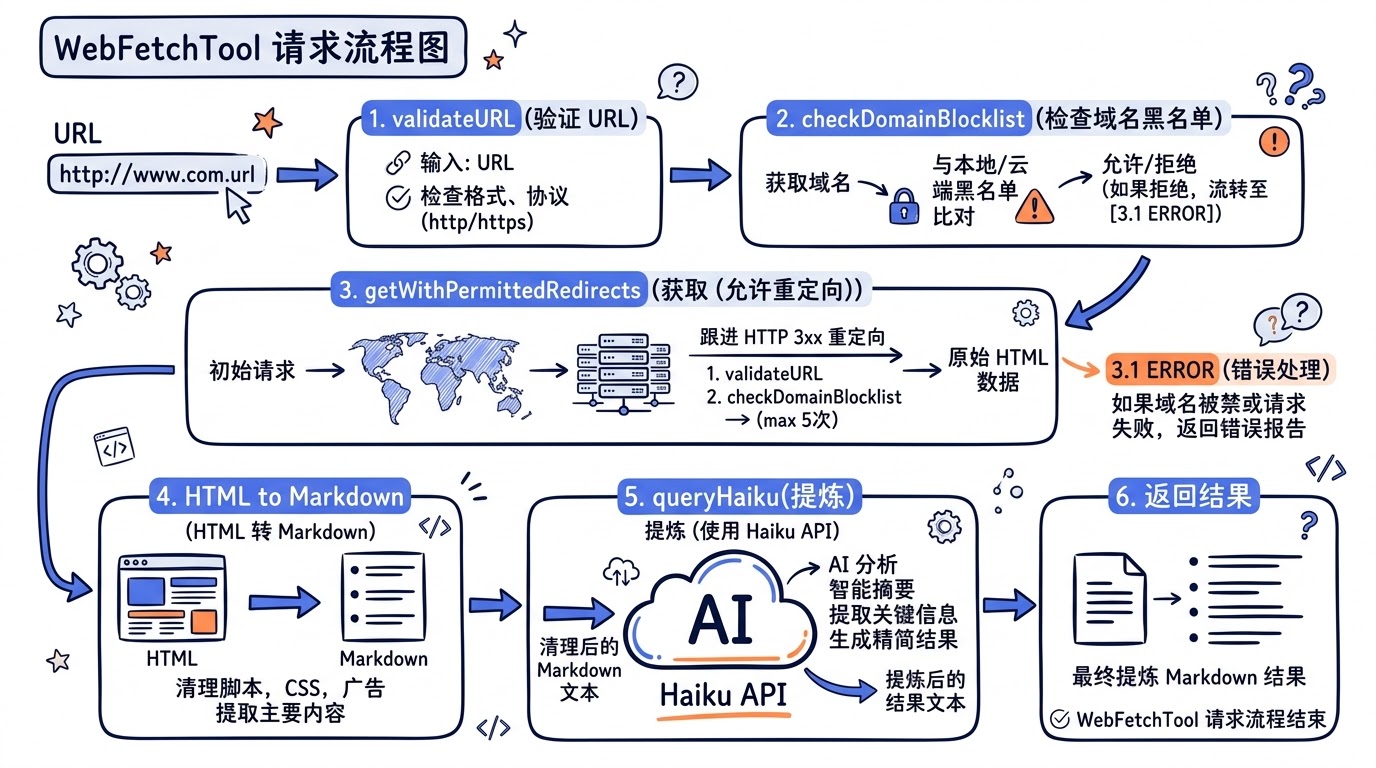
5.6.1 WebFetchTool:安全的网页抓取
WebFetchTool 允许 AI 从互联网获取内容。它的安全机制分为多层。
预批准域名列表——不需要用户确认即可访问的技术文档站点:
// 文件: src/src/tools/WebFetchTool/preapproved.ts (L14-L131)
export const PREAPPROVED_HOSTS = new Set([
  // Anthropic
  'platform.claude.com', 'modelcontextprotocol.io',
  // 编程语言文档
  'docs.python.org', 'doc.rust-lang.org', 'go.dev',
  // 框架文档
  'react.dev', 'nextjs.org', 'vuejs.org',
  // 数据库文档
  'www.postgresql.org', 'redis.io',
  // 云服务文档
  'docs.aws.amazon.com', 'kubernetes.io',
  // ...共约 80 个域名
]);
安全注释强调:这些预批准域名仅限 WebFetch(GET 请求)。Sandbox 的网络限制不继承此列表,因为 Hugging Face、Kaggle 等站点允许文件上传,不限制的网络访问可能导致数据渗透。
路径级别匹配——某些域名只预批准特定路径:
// 文件: src/src/tools/WebFetchTool/preapproved.ts (L154-L166)
export function isPreapprovedHost(
  hostname: string, pathname: string
): boolean {
  if (HOSTNAME_ONLY.has(hostname)) return true
  const prefixes = PATH_PREFIXES.get(hostname)
  if (prefixes) {
    for (const p of prefixes) {
      // 强制路径段边界:"/anthropics" 不得匹配 "/anthropics-evil/malware"
      if (pathname === p || pathname.startsWith(p + '/')) return true
    }
  }
  return false
}
例如 github.com/anthropics 是预批准的,但 github.com/anthropics-evil 不是。
重定向安全——不自动跟随跨域重定向:
// 文件: src/src/tools/WebFetchTool/utils.ts (L212-L243)
export function isPermittedRedirect(
  originalUrl: string, redirectUrl: string
): boolean {
  const parsedOriginal = new URL(originalUrl)
  const parsedRedirect = new URL(redirectUrl)
  // 协议必须相同
  if (parsedRedirect.protocol !== parsedOriginal.protocol) return false
  // 端口必须相同
  if (parsedRedirect.port !== parsedOriginal.port) return false
  // 不允许包含用户名/密码
  if (parsedRedirect.username || parsedRedirect.password) return false
  // 只允许 www 前缀的变化
  const stripWww = (h: string) => h.replace(/^www\./, '')
  return stripWww(parsedOriginal.hostname) ===
         stripWww(parsedRedirect.hostname)
}
域名黑名单检查——在真正发起请求前,先查询 Anthropic API 确认域名是否安全:
// 文件: src/src/tools/WebFetchTool/utils.ts (L176-L203)
export async function checkDomainBlocklist(
  domain: string
): Promise<DomainCheckResult> {
  if (DOMAIN_CHECK_CACHE.has(domain)) {
    return { status: 'allowed' }
  }
  const response = await axios.get(
    `https://api.anthropic.com/api/web/domain_info?domain=` +
    `${encodeURIComponent(domain)}`,
    { timeout: DOMAIN_CHECK_TIMEOUT_MS }
  )
  if (response.status === 200 && response.data.can_fetch === true) {
    DOMAIN_CHECK_CACHE.set(domain, true)
    return { status: 'allowed' }
  }
  return { status: 'blocked' }
}
域名检查结果缓存 5 分钟,URL 内容缓存 15 分钟。
内容处理——HTML 转 Markdown,然后用 Haiku 小模型提炼:
// 文件: src/src/tools/WebFetchTool/utils.ts (L484-L530)
export async function applyPromptToMarkdown(
  prompt: string,
  markdownContent: string,
  signal: AbortSignal,
  ...
): Promise<string> {
  // 截断到 100K 字符
  const truncatedContent = markdownContent.length > MAX_MARKDOWN_LENGTH
    ? markdownContent.slice(0, MAX_MARKDOWN_LENGTH) + '\n\n[Content truncated...]'
    : markdownContent

  // 用 Haiku 模型提炼
  const assistantMessage = await queryHaiku({
    systemPrompt: asSystemPrompt([]),
    userPrompt: makeSecondaryModelPrompt(truncatedContent, prompt, ...),
    signal,
    options: { querySource: 'web_fetch_apply', ... },
  })
  // ...
}
这是一个”小模型服务大模型”的经典模式:用 Haiku(快速廉价)做内容提取,结果返回给主模型(Sonnet/Opus)做推理。
5.6.2 WebSearchTool:服务端搜索
WebSearchTool 的架构与 WebFetchTool 完全不同。它不是客户端搜索,而是调用 Anthropic 的服务端搜索能力:
// 文件: src/src/tools/WebSearchTool/WebSearchTool.ts (L76-L84)
function makeToolSchema(input: Input): BetaWebSearchTool20250305 {
  return {
    type: 'web_search_20250305',
    name: 'web_search',
    allowed_domains: input.allowed_domains,
    blocked_domains: input.blocked_domains,
    max_uses: 8,  // 硬编码最多 8 次搜索
  }
}
它通过 streaming 处理搜索结果,实时提供进度反馈:
// 文件: src/src/tools/WebSearchTool/WebSearchTool.ts (L299-L388)
for await (const event of queryStream) {
  // 追踪搜索查询
  if (event.type === 'stream_event' &&
      event.event?.type === 'content_block_start') {
    if (contentBlock.type === 'server_tool_use') {
      currentToolUseId = contentBlock.id
    }
  }
  // 搜索结果到达时发送进度通知
  if (contentBlock.type === 'web_search_tool_result') {
    onProgress?.({
      toolUseID: toolUseId,
      data: {
        type: 'search_results_received',
        resultCount: Array.isArray(content) ? content.length : 0,
        query: actualQuery,
      },
    })
  }
}
WebSearchTool 只在特定 API provider 下可用:
// 文件: src/src/tools/WebSearchTool/WebSearchTool.ts (L168-L193)
isEnabled() {
  const provider = getAPIProvider()
  if (provider === 'firstParty') return true  // Anthropic 直连
  if (provider === 'vertex') {                // Google Vertex AI
    return model.includes('claude-opus-4') ||
           model.includes('claude-sonnet-4') ||
           model.includes('claude-haiku-4')
  }
  if (provider === 'foundry') return true     // Amazon Foundry
  return false
}
5.7 工具间的协作模式
六类核心工具不是孤立运作的,它们之间存在精密的协作关系。
5.7.1 Read-Before-Write 约束
FileEditTool 和 FileWriteTool 都要求文件必须先被 FileReadTool 读取过。这个约束通过 readFileState 共享状态实现:
- FileReadTool 读取文件时,在
readFileState中记录{ content, timestamp, offset, limit } - FileEditTool 校验时,检查
readFileState是否有该文件的记录 - 编辑完成后,FileEditTool 更新
readFileState中的记录
5.7.2 搜索到编辑的链路
典型的工作流是:GrepTool 搜索 -> FileReadTool 读取 -> FileEditTool 编辑。工具的设计支持这个流程:
- GrepTool 输出相对路径,节省 token
- FileReadTool 用行号标注内容,帮助模型定位
- FileEditTool 用字符串匹配而非行号,避免行号偏移问题
5.7.3 BashTool 作为兜底
当专用工具无法完成任务时,BashTool 是万能兜底。但 prompt 明确引导模型优先使用专用工具:
// 文件: src/src/tools/BashTool/prompt.ts (L280-L291)
const toolPreferenceItems = [
  `File search: Use ${GLOB_TOOL_NAME} (NOT find or ls)`,
  `Content search: Use ${GREP_TOOL_NAME} (NOT grep or rg)`,
  `Read files: Use ${FILE_READ_TOOL_NAME} (NOT cat/head/tail)`,
  `Edit files: Use ${FILE_EDIT_TOOL_NAME} (NOT sed/awk)`,
  `Write files: Use ${FILE_WRITE_TOOL_NAME} (NOT echo >/cat <<EOF)`,
  'Communication: Output text directly (NOT echo/printf)',
]
动手实践
练习 1:追踪一次 BashTool 调用的安全检查链
在 Claude Code 中执行 git push --force,然后阅读日志,追踪以下问题:
destructiveCommandWarning.ts返回了什么警告?bashSecurity.ts的哪些检查被触发了?- 最终的 permission decision 是
allow、ask还是deny?
练习 2:FileEditTool 的唯一性检查实验
创建一个包含重复字符串的测试文件,尝试用 FileEditTool 编辑:
# 创建测试文件
echo -e "hello world\nhello world\nhello world" > /tmp/test-edit.txt
然后让 Claude Code 执行 Edit(file_path="/tmp/test-edit.txt", old_string="hello world", new_string="hi"),观察错误消息。
练习 3:阅读 AgentTool 的 fork 消息构建
阅读 forkSubagent.ts 中的 buildChildMessage 函数,理解:
- 为什么 fork 子代理被告知”不要再 fork”?
- 输出格式为什么强制以
Scope:开头? - 500 字限制的设计意图是什么?
练习 4:实现一个简化版 GrepTool
参考 GrepTool.ts 的结构,用 buildTool 实现一个只支持 files_with_matches 模式的简化版。需要实现:inputSchema、validateInput、call、mapToolResultToToolResultBlockParam。
源码对照表
| 功能模块 | 核心文件路径 | 行数(约) | 关键函数/类 |
|---|---|---|---|
| BashTool 主逻辑 | tools/BashTool/BashTool.tsx |
~900 | BashTool.call(), runShellCommand() |
| Bash 安全引擎 | tools/BashTool/bashSecurity.ts |
~800 | bashCommandIsSafeAsync_DEPRECATED() |
| Bash 危险命令 | tools/BashTool/destructiveCommandWarning.ts |
~100 | getDestructiveCommandWarning() |
| Bash Sandbox | tools/BashTool/shouldUseSandbox.ts |
~150 | shouldUseSandbox() |
| Bash Exit Code | tools/BashTool/commandSemantics.ts |
~140 | interpretCommandResult() |
| Bash 复合命令 | tools/BashTool/bashCommandHelpers.ts |
~265 | checkCommandOperatorPermissions() |
| FileEdit 主逻辑 | tools/FileEditTool/FileEditTool.ts |
~625 | FileEditTool.call(), validateInput() |
| FileEdit 工具函数 | tools/FileEditTool/utils.ts |
~775 | findActualString(), preserveQuoteStyle() |
| FileEdit Prompt | tools/FileEditTool/prompt.ts |
~30 | getEditToolDescription() |
| FileRead 主逻辑 | tools/FileReadTool/FileReadTool.ts |
~1180 | callInner(), readImageWithTokenBudget() |
| FileRead 限制 | tools/FileReadTool/limits.ts |
~90 | getDefaultFileReadingLimits() |
| AgentTool Prompt | tools/AgentTool/prompt.ts |
~290 | getPrompt() |
| AgentTool 运行 | tools/AgentTool/runAgent.ts |
~970 | runAgent() |
| AgentTool Fork | tools/AgentTool/forkSubagent.ts |
~210 | buildForkedMessages(), isInForkChild() |
| AgentTool 内建 | tools/AgentTool/builtInAgents.ts |
~70 | getBuiltInAgents() |
| GrepTool | tools/GrepTool/GrepTool.ts |
~580 | GrepTool.call(), applyHeadLimit() |
| GlobTool | tools/GlobTool/GlobTool.ts |
~200 | GlobTool.call() |
| WebFetchTool | tools/WebFetchTool/WebFetchTool.ts |
~320 | WebFetchTool.call() |
| WebFetch Utils | tools/WebFetchTool/utils.ts |
~530 | getURLMarkdownContent(), applyPromptToMarkdown() |
| WebFetch 预批准 | tools/WebFetchTool/preapproved.ts |
~165 | isPreapprovedHost() |
| WebSearchTool | tools/WebSearchTool/WebSearchTool.ts |
~435 | WebSearchTool.call() |
本章小结
本章深入剖析了 Claude Code 的六类核心工具,揭示了以下关键设计原则:
1. 纵深防御(Defense in Depth)
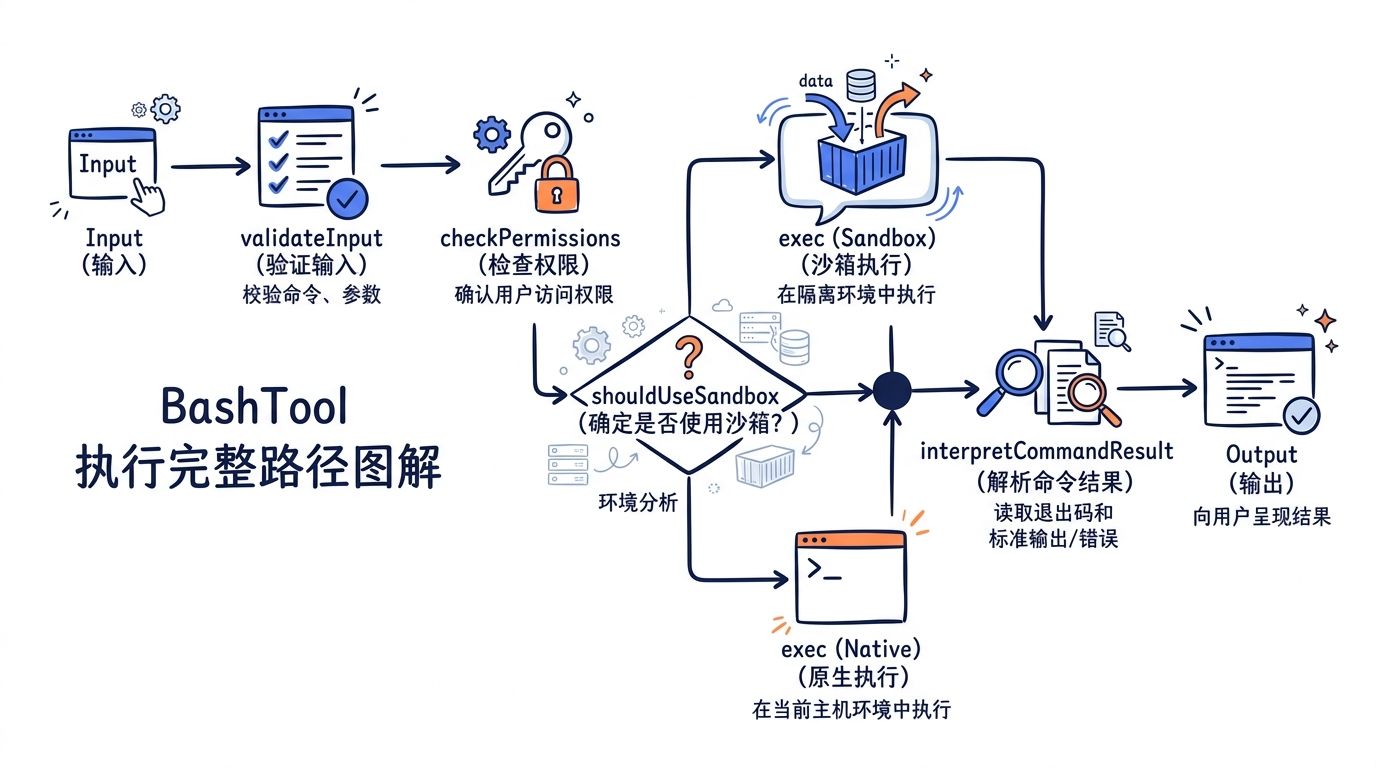
BashTool 展示了这一原则的极致运用。从外到内有五层防护:Sandbox 隔离 -> 安全校验引擎 -> 复合命令分析 -> 危险命令警告 -> 权限确认。任何单层失效都不会直接导致安全事故。
2. 对 LLM 的容错设计
FileEditTool 的 curly quote 处理、semanticNumber/semanticBoolean 的类型容错、de-sanitization 机制——这些都不是”正确性”需求,而是对”模型可能犯的错”的主动兜底。好的 AI 工具必须理解它的调用者(LLM)的行为特征。
3. 乐观锁与最终一致性
FileEditTool 的 Read-Before-Write + mtime 校验是经典的乐观锁模式。它不阻止并发(多个工具可以同时工作),但在提交时检测冲突。这比悲观锁(全局文件锁)更适合 AI Agent 的工作模式。
4. 小模型服务大模型
WebFetchTool 用 Haiku 做内容提取是一个高效的架构模式。大模型的 context window 是昂贵资源,用小模型做预处理可以显著节省成本。
5. 工具是约束,不只是能力
每个工具不仅赋予 AI 能力,更重要的是通过 validateInput、checkPermissions、安全检查等机制约束 AI 的行为边界。工具系统的核心价值不是”让 AI 能做什么”,而是”让 AI 安全地做什么”。
下一章 Ch06 进入”工具系统”模块的最后一块拼图——StreamingToolExecutor:当多个工具调用同时到来时,Claude Code 如何决定哪些可以并行、哪些必须串行、如何在保持顺序的前提下最大化吞吐?这是工具系统从”能用”到”高效”的关键工程。
思考题
BashTool 和 FileEditTool 的设计哲学有什么本质差异?
欢迎在评论区聊聊你的想法。
下一讲,我们换个角度看《流式执行引擎》。