第十四章 Plugins 与 Slash Commands——可分发的能力包与统一调用接口
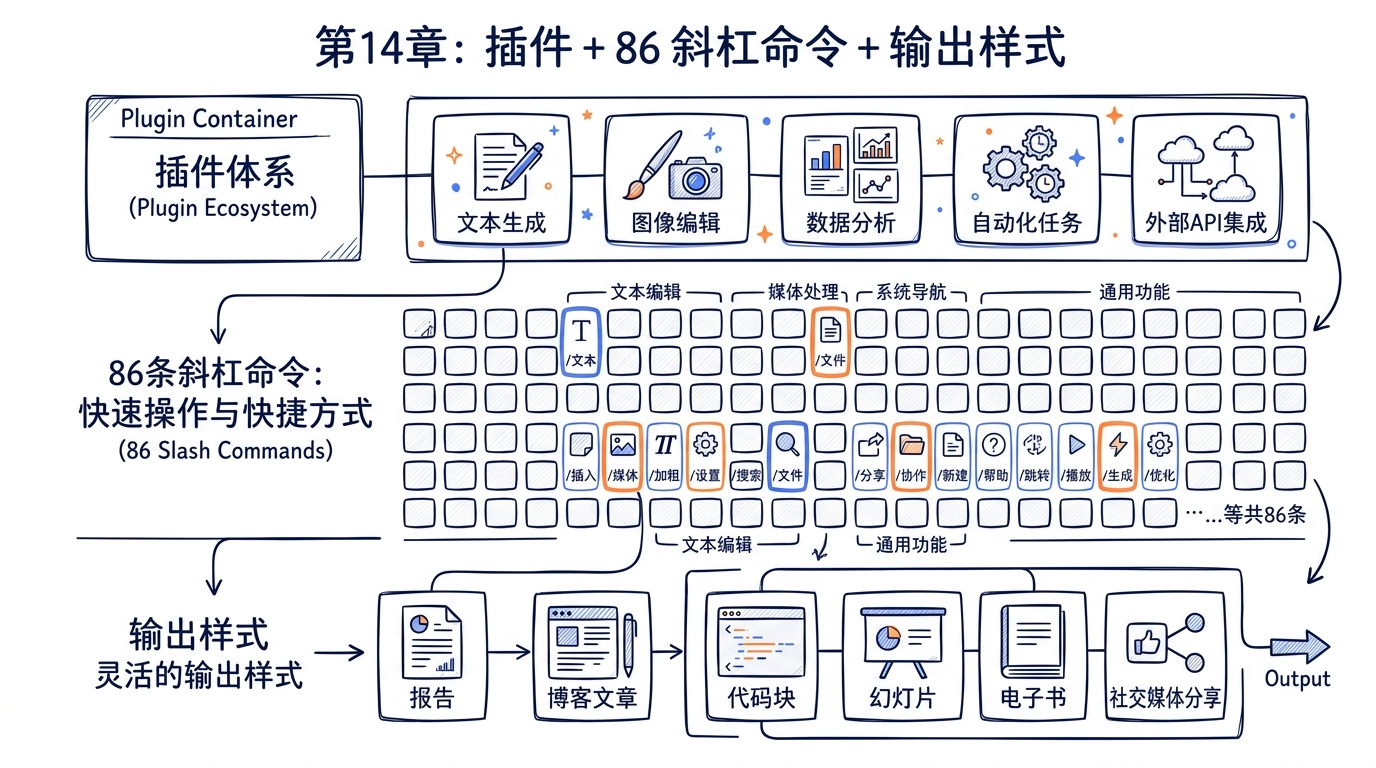
核心命题:第十三章我们看到了 Skill 是 Claude Code 扩展体系的最小单元,它本质上是一段带元数据的 Markdown prompt。但如果只有 Skill,问题立刻浮现——Skill 是孤立的,它没有版本号、没有依赖、没有 Hooks 配置、没有自带的 MCP server。如果想要分发一组协作的能力(比如”前端开发套件”=10 个相关 Skill + 一组 Hooks + 一个 Figma MCP server),怎么办?答案是 Plugin——把 Skills、Hooks、MCP servers、命令、agents、output styles 打包在一起的”完整功能包”。理解 Plugin、Slash Command、Output Style 三者的协作关系,就理解了 Claude Code 如何从一个固定功能的 CLI 演进成一个可分发的扩展平台。
14.1 Plugin 系统设计哲学:为什么 Skill 不够用
在第十三章,我们详细分析了 Skill 体系——SKILL.md 文件加 frontmatter,加上 loadSkillsDir.ts 的六种来源加载(policySettings / userSettings / projectSettings / bundled / commandDir / mcp)。Skill 系统已经足够强大,可以让用户和企业管理员自定义 Claude 的行为模板。
那么为什么还需要 Plugin?
14.1.1 Skill 的天花板
Skill 解决的是”如何把一段 prompt + 工具白名单注入到对话上下文”的问题。它有三个固有的边界:
- 粒度只到单文件。一个 Skill 是一个 Markdown 文件,元数据放在 frontmatter 里。如果某个能力需要 10 个相互协作的 Skill,用户必须手动把这 10 个文件复制到
~/.claude/skills/下。 - 没有版本与依赖。Skill 没有
version字段(即使写了也不会被验证),更不用说dependencies。如果 Skill A 的某次升级修改了它依赖的某个共享 prompt 片段的格式,没有任何机制能保护下游 Skill B 不被破坏。 - 不能携带”非 Skill”组件。Skill 不能自带 Hooks(它在 frontmatter 里只能引用,不能定义)、不能自带 MCP server 配置、不能自带 output style。这些”配套设施”必须由用户自己单独配置。
简单说,Skill 是”指令注入的最小单元”,但它不是”分发与协作的最小单元”。
14.1.2 Plugin 的边界——一个完整功能包
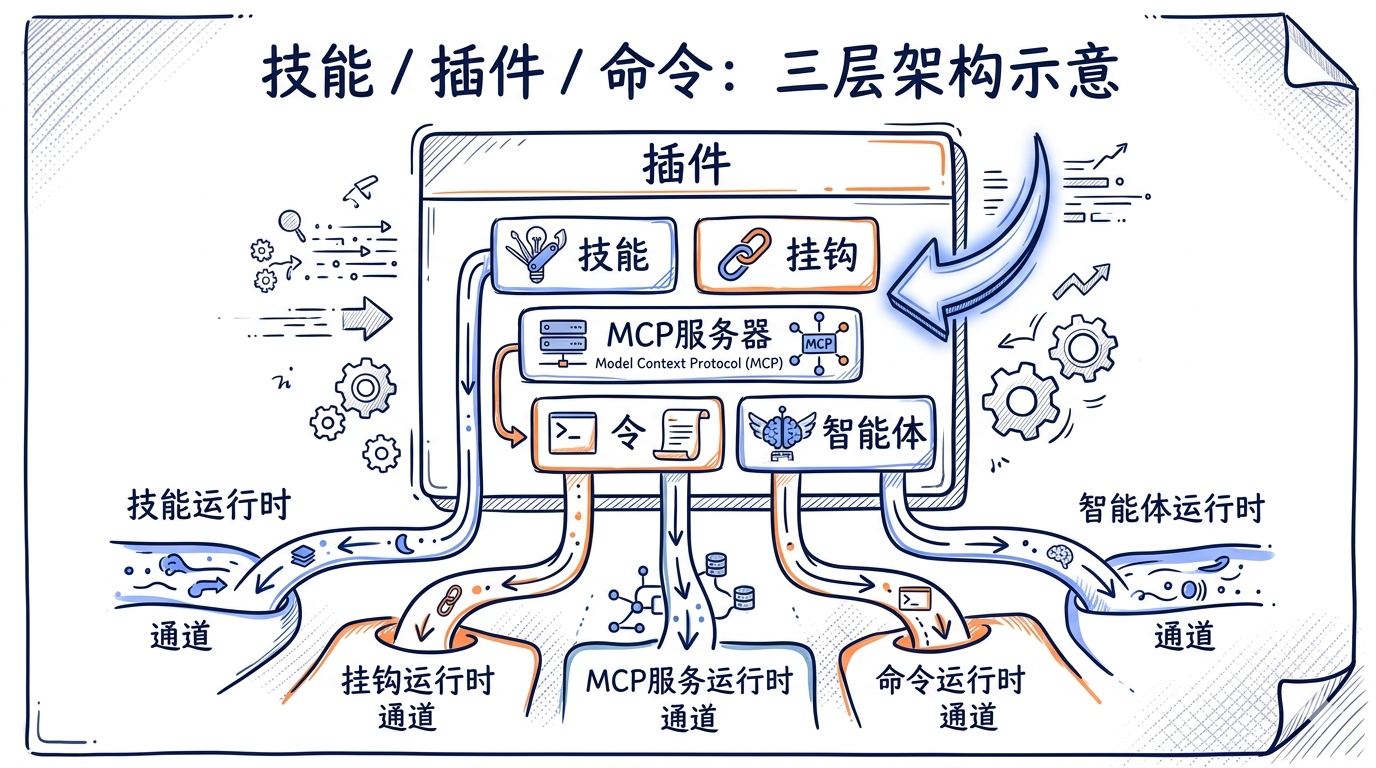
Plugin 是 Claude Code 的”分发与协作单元”。一个 Plugin 至少包含一个 plugin.json manifest,可以同时携带以下五种组件:
| 组件 | 子目录 | 角色 |
|---|---|---|
| Commands | commands/ |
自定义 Slash Command(Markdown 形式) |
| Agents | agents/ |
自定义 Sub-agent 角色 |
| Skills | skills/ |
标准 Skill 文件 |
| Hooks | hooks/hooks.json |
生命周期钩子 |
| MCP servers | plugin.json#mcpServers |
内嵌 MCP server 配置 |
| Output styles | output-styles/ |
Markdown 渲染样式 |
源码里这一点写得很清楚。src/utils/plugins/pluginLoader.ts:14-25 的注释直接列了目录结构示例:
my-plugin/
├── plugin.json          # Optional manifest with metadata
├── commands/            # Custom slash commands
│   ├── build.md
│   └── deploy.md
├── agents/              # Custom AI agents
│   └── test-runner.md
└── hooks/               # Hook configurations
    └── hooks.json       # Hook definitions
注意 Plugin 是”组件容器”,它本身没有”主入口”——加载器会同时扫描 commands/ agents/ skills/ hooks/ 等子目录,把里面的内容分别注册到对应的子系统去。一个 Plugin 不是一个对象,而是 5 个子系统的”批量注入”。
14.1.3 Skill / Plugin / Command 三系定位
为了避免后面章节混淆,先把三个概念的边界用一张表钉死:
| 维度 | Skill | Plugin | Slash Command |
|---|---|---|---|
| 物理形态 | 一个 SKILL.md 文件 |
一个目录(含 plugin.json) |
内置:一个 TS 模块;Plugin 提供:commands/*.md |
| 单位 | 单个 prompt 模板 | 一组组件(含多 Skill) | 单个调用接口 |
| 分发 | 直接复制文件 | marketplace + git URL | 跟随 Plugin 分发或直接内置 |
| 版本 | frontmatter 里可写 version(不强制) |
manifest 里有 version(参与依赖解析) |
跟随 Plugin |
| 调用入口 | 模型通过 SkillTool 调用,或用户 /skill-name |
用户通过 /plugin UI 管理,不直接”调用” |
用户输入 /cmd,或模型 SkillTool 调用 |
| 来源数量 | 6 种(参见 13.3) | 4 种 scope(user/project/local/managed) | 内置 86 个 + Plugin 提供 |
一句话总结:Plugin 是 Skill / Command / Hook / MCP server 的容器与分发机制,而 Slash Command 是所有”可调用”扩展的统一接口。Plugin 自己不直接”运行”,它只负责把内容贡献给相应的子系统。
14.1.4 内置 Plugin Registry 与 bundled skills 的边界
源码里有一个容易让人困惑的细节:src/plugins/builtinPlugins.ts 和 src/skills/bundled/ 看起来都”内置”,它们的关系是什么?
src/plugins/builtinPlugins.ts:6-13 在文件头注释里直接给了答案:
/**
 * Built-in plugins differ from bundled skills (src/skills/bundled/) in that:
 * - They appear in the /plugin UI under a "Built-in" section
 * - Users can enable/disable them (persisted to user settings)
 * - They can provide multiple components (skills, hooks, MCP servers)
 */
简而言之:
- bundled skill = 内置 skill 单元,不可被禁用(如
verify、debug、remember),共 17 个文件(16 个 skill + 1 个 index)。 - built-in plugin = 容器化的内置组件包,可被用户禁用,会出现在
/pluginUI。
而当前 v2.1.88 的状态是:built-in plugin registry 存在但是空的。src/plugins/bundled/index.ts 只有 23 行,整个文件就是一个空壳:
export function initBuiltinPlugins(): void {
  // No built-in plugins registered yet — this is the scaffolding for
  // migrating bundled skills that should be user-toggleable.
}
这是一个”装载入口已就位但内部尚无注册项”的状态——这也是为什么权威数字表里写”0 个 bundled plugin + 1 个 bundled plugin index 装载入口”。这个空壳的存在本身就是一种设计——它是为未来的”用户可禁用 bundled 能力”留出的迁移路径。
14.1.5 设计哲学小结
Plugin 系统的设计哲学可以归纳为三个原则:
- 打包不绑定:Plugin 是分发单位,但运行时不存在”Plugin 这个对象”——它的内容会散到 Skills/Commands/Hooks/MCP/OutputStyles 五个子系统各自处理。这避免了”Plugin 内核”成为 monolithic API。
- 声明式优先:Plugin 的所有元数据通过
plugin.json和子目录约定声明,没有运行时初始化代码(不需要 plugin 写”激活函数”)。这让 Plugin 可以在不执行任何代码的前提下被静态分析、缓存、签名校验。 - Marketplace 驱动:Plugin 不通过 npm 直接分发,而是通过 marketplace(一个声明了一组 plugin 来源的 JSON 配置)。
plugin@marketplace形式的 ID 让”plugin 的真实位置”可以由用户切换的 marketplace 决定。
下一节我们就深入 Plugin 的生命周期,看看一个 Plugin 从被声明到出现在运行时调用栈的全过程。
14.2 Plugin 生命周期:从安装到激活
Plugin 不是被”导入”的——它没有 require() 入口。Plugin 是被”扫描、加载、注入”的。理解这个生命周期对理解为什么 /reload-plugins 是必要的至关重要。
14.2.1 五个状态阶段
源码把 Plugin 的生命周期划分为五个阶段:
| 阶段 | 触发时机 | 关键文件 |
|---|---|---|
| install | 用户 /plugin 安装、或启动时 reconcile |
src/utils/plugins/pluginInstallationHelpers.ts、src/services/plugins/PluginInstallationManager.ts |
| load | 启动时 / /reload-plugins |
src/utils/plugins/pluginLoader.ts (loadAllPlugins()) |
| activate | 加载后立即 | src/hooks/useManagePlugins.ts |
| deactivate | 用户禁用、settings 变更 | src/utils/plugins/refresh.ts (refreshActivePlugins()) |
| uninstall | 用户主动卸载 / 被 blocklist | src/utils/plugins/installedPluginsManager.ts、src/utils/plugins/pluginBlocklist.ts |
14.2.2 install 阶段——marketplace reconcile
启动时,Claude Code 不会主动去检查每个 plugin 是否已安装。它走的是一条更精巧的路径——marketplace reconcile。src/services/plugins/PluginInstallationManager.ts:60-93 是核心入口:
export async function performBackgroundPluginInstallations(
  setAppState: SetAppState,
): Promise<void> {
  logForDebugging('performBackgroundPluginInstallations called')

  try {
    // Compute diff upfront for initial UI status (pending spinners)
    const declared = getDeclaredMarketplaces()
    const materialized = await loadKnownMarketplacesConfig().catch(() => ({}))
    const diff = diffMarketplaces(declared, materialized)

    const pendingNames = [
      ...diff.missing,
      ...diff.sourceChanged.map(c => c.name),
    ]

    setAppState(prev => ({
      ...prev,
      plugins: {
        ...prev.plugins,
        installationStatus: {
          marketplaces: pendingNames.map(name => ({
            name,
            status: 'pending' as const,
          })),
          plugins: [],
        },
      },
    }))

    if (pendingNames.length === 0) {
      return
    }
    // ...继续 reconcile
  }
}
注意几个关键设计:
- declared vs materialized 的 diff:
declared来自 settings(用户/项目/管理员声明要哪些 marketplace),materialized来自磁盘缓存。两者求 diff 出missing(缺失的)+sourceChanged(URL/branch 改了的)。 - 后台执行:
performBackgroundPluginInstallations是一个不阻塞启动的后台任务。REPL 已经可以交互,plugin 安装在后面悄悄进行。这个设计避免了”启动时卡在 git clone 100 个 marketplace”的最坏情况。 - 进度通过 setAppState 推回 UI:
pending→installing→installed/failed,状态变化通过 React 状态推回 REPL 的状态条。
14.2.3 load 阶段——loadAllPlugins
加载阶段集中在 src/utils/plugins/pluginLoader.ts。这个文件足足有 30+ 个导出函数,但核心入口只有一个 loadAllPlugins()。它做四件事:
- 遍历所有声明的 plugin scope:user / project / local(CLI flag)/ managed(企业策略)。
- 对每个 plugin 解析
plugin.jsonmanifest:用 zod schema 校验。 - 按子目录扫描组件:
commands//agents//skills//hooks//output-styles/。 - 构造 LoadedPlugin 对象:包含元数据 + 各子目录的解析路径。
LoadedPlugin 类型在 src/types/plugin.ts:48-70 定义:
export type LoadedPlugin = {
  name: string
  manifest: PluginManifest
  path: string
  source: string
  repository: string
  enabled?: boolean
  isBuiltin?: boolean
  sha?: string
  commandsPath?: string
  commandsPaths?: string[]
  commandsMetadata?: Record<string, CommandMetadata>
  agentsPath?: string
  agentsPaths?: string[]
  skillsPath?: string
  skillsPaths?: string[]
  outputStylesPath?: string
  outputStylesPaths?: string[]
  hooksConfig?: HooksSettings
  mcpServers?: Record<string, McpServerConfig>
  lspServers?: Record<string, LspServerConfig>
  settings?: Record<string, unknown>
}
注意每种组件都有 *Path 和 *Paths(plural)两个字段——这是为了支持 manifest 里声明的”额外路径”(即一个 plugin 可以让 commands 同时来自 commands/ 和 extra-cmds/ 两个目录)。
14.2.4 activate 阶段——useManagePlugins
加载完成的 LoadedPlugin 还需要被”激活”——也就是把它的内容真正注入到对应的子系统。这个角色由 React hook src/hooks/useManagePlugins.ts 承担。挑核心一段看:
// src/hooks/useManagePlugins.ts:51-110

const initialPluginLoad = useCallback(async () => {
  try {
    // Load all plugins - capture errors array
    const { enabled, disabled, errors } = await loadAllPlugins()

    // Detect delisted plugins, auto-uninstall them, and record as flagged.
    await detectAndUninstallDelistedPlugins()

    // Notify if there are flagged plugins pending dismissal
    const flagged = getFlaggedPlugins()
    if (Object.keys(flagged).length > 0) {
      addNotification({
        key: 'plugin-delisted-flagged',
        text: 'Plugins flagged. Check /plugins',
        color: 'warning',
        priority: 'high',
      })
    }

    let commands: Command[] = []
    let agents: AgentDefinition[] = []

    try {
      commands = await getPluginCommands()
    } catch (error) {
      // ...错误收集到 errors[]
    }

    try {
      agents = await loadPluginAgents()
    } catch (error) {
      // ...
    }

    try {
      await loadPluginHooks()
    } catch (error) {
      // ...
    }

    // ...继续:MCP server / LSP server 加载
  }
})
关键点:
- 错误隔离:每种组件的加载失败都被局部 try/catch,不会让一个坏 plugin 把整个 Claude Code 拉崩。错误统一汇总到
errors[],最终展示在/doctor输出里。 - delisted 检测:每次启动会检查”该 plugin 是否被官方下架”——这是 plugin 系统的安全机制(在 14.9 详述)。
- MCP server 计数:MCP server 的 connection key 会因为 plugin 列表变化而变化,触发 MCP 子系统重连,所以这里要单独维护
mcp_count。
14.2.5 deactivate / refresh 阶段
用户在 /plugin UI 切换某个 plugin 的启用状态后,不需要重启 Claude Code——refreshActivePlugins() 会处理在线刷新。/reload-plugins 命令的实现就是直接调用这个函数,源码 src/commands/reload-plugins/reload-plugins.ts:36-58:
const r = await refreshActivePlugins(context.setAppState)

const parts = [
  n(r.enabled_count, 'plugin'),
  n(r.command_count, 'skill'),
  n(r.agent_count, 'agent'),
  n(r.hook_count, 'hook'),
  n(r.mcp_count, 'plugin MCP server'),
  n(r.lsp_count, 'plugin LSP server'),
]
let msg = `Reloaded: ${parts.join(' · ')}`

if (r.error_count > 0) {
  msg += `\n${n(r.error_count, 'error')} during load. Run /doctor for details.`
}

return { type: 'text', value: msg }
refreshActivePlugins 内部的关键操作:
- 清空 plugin 相关的 memoize 缓存(
clearPluginCache、clearPluginCommandCache、clearPluginSkillsCache)。 - 重新读 settings(包括 settingsSync 拉回的远端配置)。
- 重新跑一次
loadAllPlugins。 - 把 commands / agents / hooks / MCP / LSP 五类组件全量替换到 AppState。
这个”全量替换”是 plugin 系统的核心一致性保证——它让 plugin 状态在任何时刻都是一个原子快照,不会出现”半启用”的中间态。
14.2.6 uninstall 阶段
用户主动卸载(/plugin uninstall)走 installedPluginsManager.ts 的 uninstallPlugin():从 settings 里移除条目,从磁盘缓存里删除目录,触发 refreshActivePlugins。
而被动卸载(即 plugin 被 marketplace 下架)走 pluginBlocklist.ts 的 detectAndUninstallDelistedPlugins()——它会查询官方 blocklist,把已被下架的 plugin 静默卸载,并标记 flag 给用户在 /plugins 里看到。
14.3 bundled plugin 装载入口与 plugin 目录解析
上一节我们梳理了 plugin 的生命周期,这一节我们深入”plugin 是怎么从磁盘上被读出来的”——也就是 plugin.json 与目录结构的解析逻辑。
14.3.1 bundled/index.ts 的”装载入口”性质
先回到 src/plugins/bundled/index.ts。前面 14.1.4 提过它是一个空壳——但要理解为什么它依然是”装载入口”,需要看完整的 23 行:
/**
 * Built-in Plugin Initialization
 *
 * Initializes built-in plugins that ship with the CLI and appear in the
 * /plugin UI for users to enable/disable.
 *
 * Not all bundled features should be built-in plugins — use this for
 * features that users should be able to explicitly enable/disable. For
 * features with complex setup or automatic-enabling logic (e.g.
 * claude-in-chrome), use src/skills/bundled/ instead.
 *
 * To add a new built-in plugin:
 * 1. Import registerBuiltinPlugin from '../builtinPlugins.js'
 * 2. Call registerBuiltinPlugin() with the plugin definition here
 */

/**
 * Initialize built-in plugins. Called during CLI startup.
 */
export function initBuiltinPlugins(): void {
  // No built-in plugins registered yet — this is the scaffolding for
  // migrating bundled skills that should be user-toggleable.
}
这个”空函数”的存在揭示了一个设计意图——保留向后兼容的 API。initBuiltinPlugins() 在 CLI 启动序列里被调用:未来无论是”把 verify skill 升格为可禁用 plugin”,还是”加一个 anthropic-managed-suite plugin”,都不需要修改启动序列,只需要在这个函数里新增 registerBuiltinPlugin(...) 调用。
权威数字表里写的”0 个 bundled plugin + 1 个装载入口”指的就是这个状态:注册槽位是 1 个,注册项目数是 0 个。
14.3.2 用户级 plugin 目录
用户级 plugin 安装后位于 ~/.claude/plugins/ 下。完整布局是:
~/.claude/
├── plugins/
│   ├── known_marketplaces.json    # 用户声明的 marketplace 列表
│   ├── marketplaces/              # marketplace 定义缓存
│   │   ├── my-marketplace.json
│   │   └── github-marketplace/
│   │       └── .claude-plugin/
│   │           └── marketplace.json
│   └── installed/
│       └── my-plugin@my-marketplace/
│           ├── plugin.json
│           ├── commands/
│           │   └── deploy.md
│           ├── skills/
│           │   └── my-skill/
│           │       └── SKILL.md
│           └── hooks/
│               └── hooks.json
src/utils/plugins/marketplaceManager.ts:1-19 的注释完整描述了这一布局:
File structure managed by this module:
~/.claude/
  └── plugins/
      ├── known_marketplaces.json    # Configuration of all known marketplaces
      └── marketplaces/              # Cache directory for marketplace data
          ├── my-marketplace.json    # Cached marketplace from URL source
          └── github-marketplace/    # Cloned repository for GitHub source
              └── .claude-plugin/
                  └── marketplace.json
注意几个关键约定:
-
plugin ID 是
name@marketplace形式。isBuiltinPluginId在src/plugins/builtinPlugins.ts:37-39直接用后缀@builtin判断是否内置:export function isBuiltinPluginId(pluginId: string): boolean { return pluginId.endsWith(`@${BUILTIN_MARKETPLACE_NAME}`) } -
目录命名包含 marketplace。即使两个 marketplace 都提供了一个名叫
formatter的 plugin,它们也会被装到formatter@marketplace-a/和formatter@marketplace-b/两个不同目录,避免冲突。 -
.claude-plugin/marketplace.json是 marketplace 自身的 manifest,不要和plugin.json(plugin 自身的 manifest)搞混。
14.3.3 项目级 plugin 目录
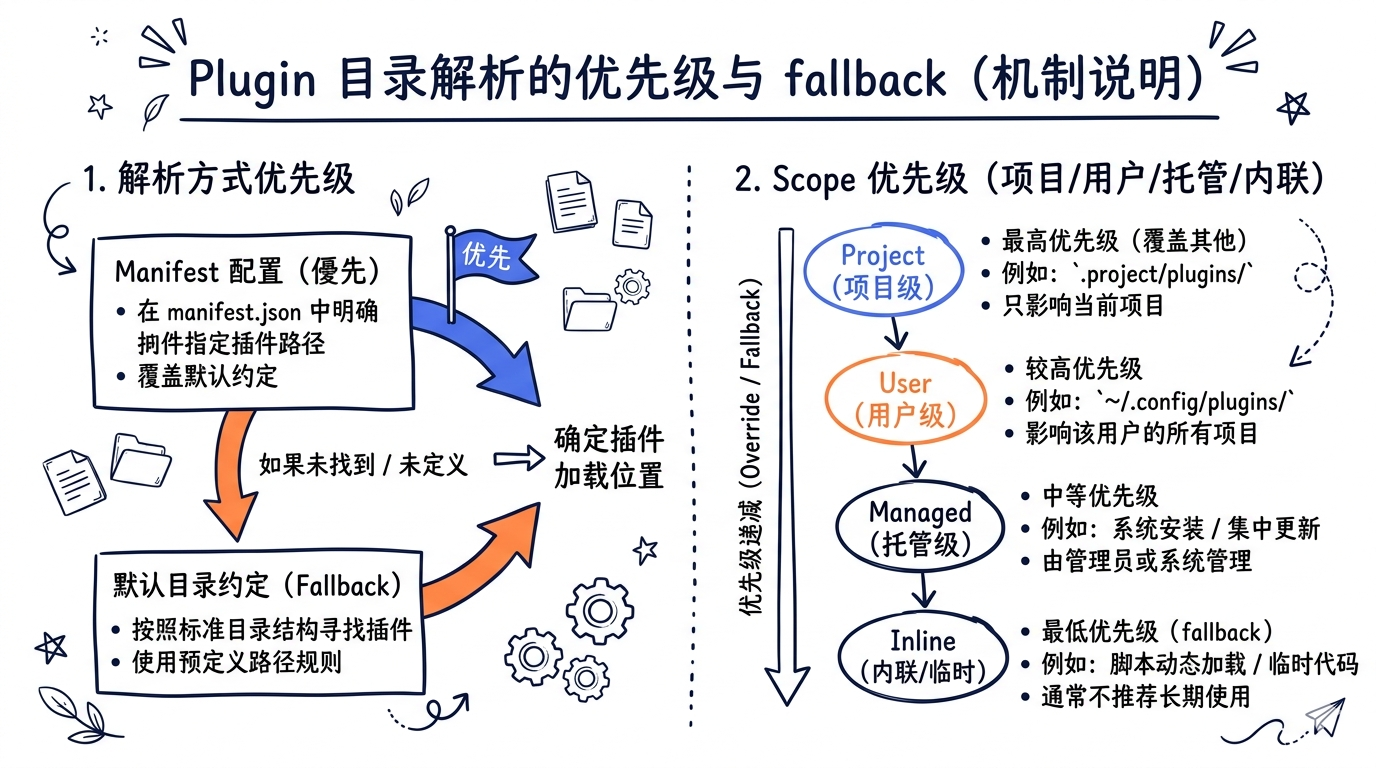
项目级 plugin 的位置是 <project>/.claude/plugins/。它的优先级高于用户级 plugin(即同名 plugin,项目级覆盖用户级)。这一点和 settings 体系一致——越接近调用现场,越优先。
项目级和用户级的 plugin 走完全相同的加载流程,唯一差别是 LoadedPlugin.source 字段值:
- 用户级 →
source: 'userSettings'(更准确说是${pluginName}@${marketplaceName}) - 项目级 →
source: 'projectSettings'
14.3.4 inline plugin 与 –plugin-dir
除了 marketplace 安装的 plugin,Claude Code 还支持两种”非 marketplace”plugin:
--plugin-dir <path>CLI flag:临时加载某个本地目录作为 plugin(开发场景)。- SDK
plugins选项:通过 SDK 调用时直接传入 plugin 配置。
这两种统称 “inline plugin”。src/utils/plugins/pluginLoader.ts:49 引入它们:
import { getInlinePlugins } from '../../bootstrap/state.js'
加载时它们与 marketplace plugin 走相同的子目录扫描逻辑,但不会被持久化到 installed_plugins.json——下次启动需要再次传入 --plugin-dir。
14.3.5 manifest 验证:plugin.json schema
每个 plugin 的根目录都可以放一个 plugin.json。它的 schema 定义在 src/utils/plugins/schemas.ts,核心字段包括:
| 字段 | 类型 | 用途 |
|---|---|---|
name |
string | plugin 名(必须) |
version |
string | semver 版本 |
description |
string | UI 展示用 |
author |
object/string | 作者信息 |
commands |
string | array | object | 自定义 commands 路径 |
agents |
string | array | 自定义 agents 路径 |
skills |
string | array | skills 路径 |
outputStyles |
string | array | output styles 路径 |
hooks |
string | object | hooks 路径或内联定义 |
mcpServers |
object | 内嵌 MCP server 配置 |
注意 commands 字段支持三种形式:
- string:单个目录路径(如
"commands") - array:多个目录路径
- object:name → metadata 映射(用于给 commands 加描述、标签等)
object 形式让 manifest 可以为命令提供”额外元数据”——这就是 LoadedPlugin.commandsMetadata 字段的来源(src/types/plugin.ts:59):
commandsMetadata?: Record<string, CommandMetadata>
14.3.6 plugin.json 没有时的 fallback
如果一个 plugin 目录里没有 plugin.json,loader 不会报错,而是用一组默认约定:
name= 目录名commands=commands/(如果目录存在)agents=agents/(如果目录存在)skills=skills/(如果目录存在)hooks=hooks/hooks.json(如果文件存在)
这个”零配置 plugin”模式让用户可以最快速地把一个本地目录当 plugin 使用——只要目录结构对,连 manifest 都不用写。
14.4 86 个 Slash Commands 完整目录与分类
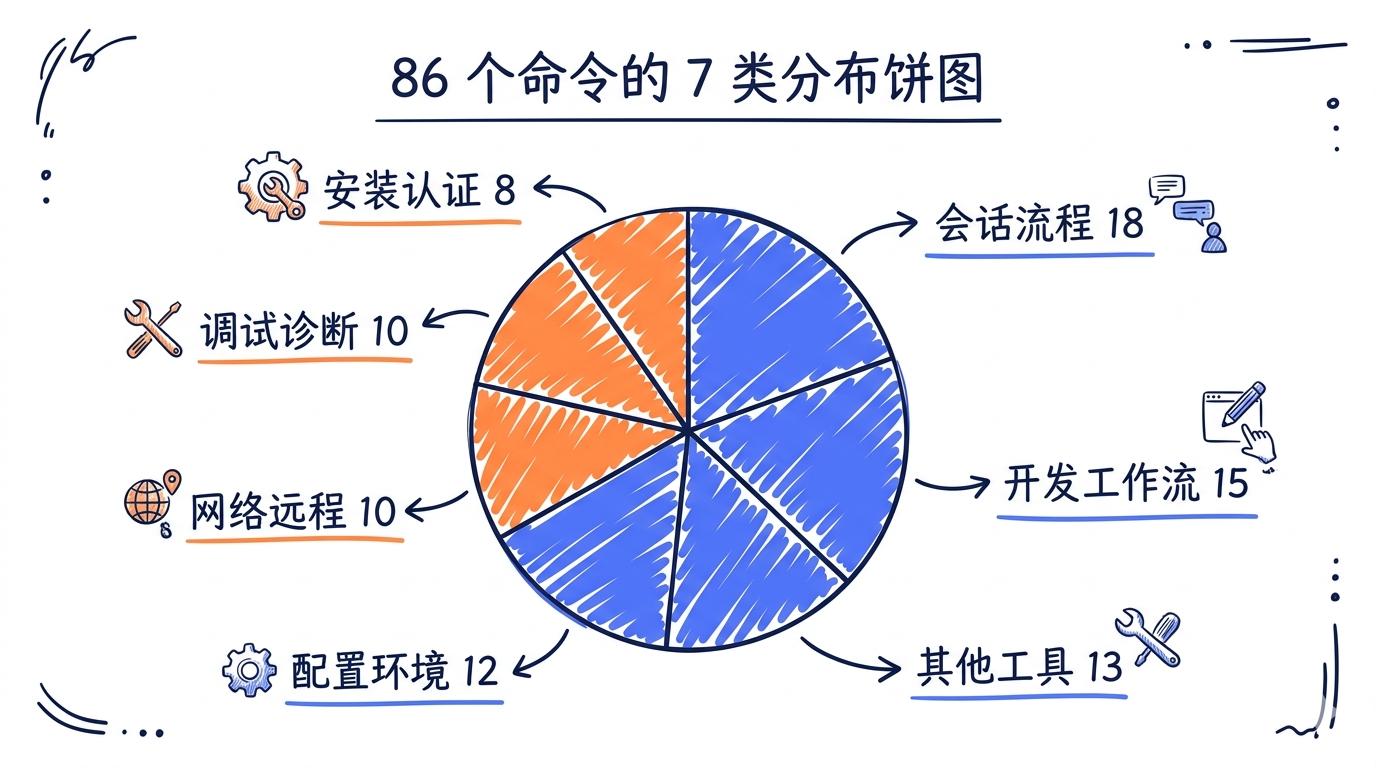
src/commands/ 目录下有 86 个 slash command 子目录(不计 *.ts 直接定义的若干命令),它们构成了 Claude Code 内置命令的全集。这一节我们按教学口径分成 7 大类,给出每类的代表命令、源码路径,并深入讲解 5-8 个最常用命令的实现。
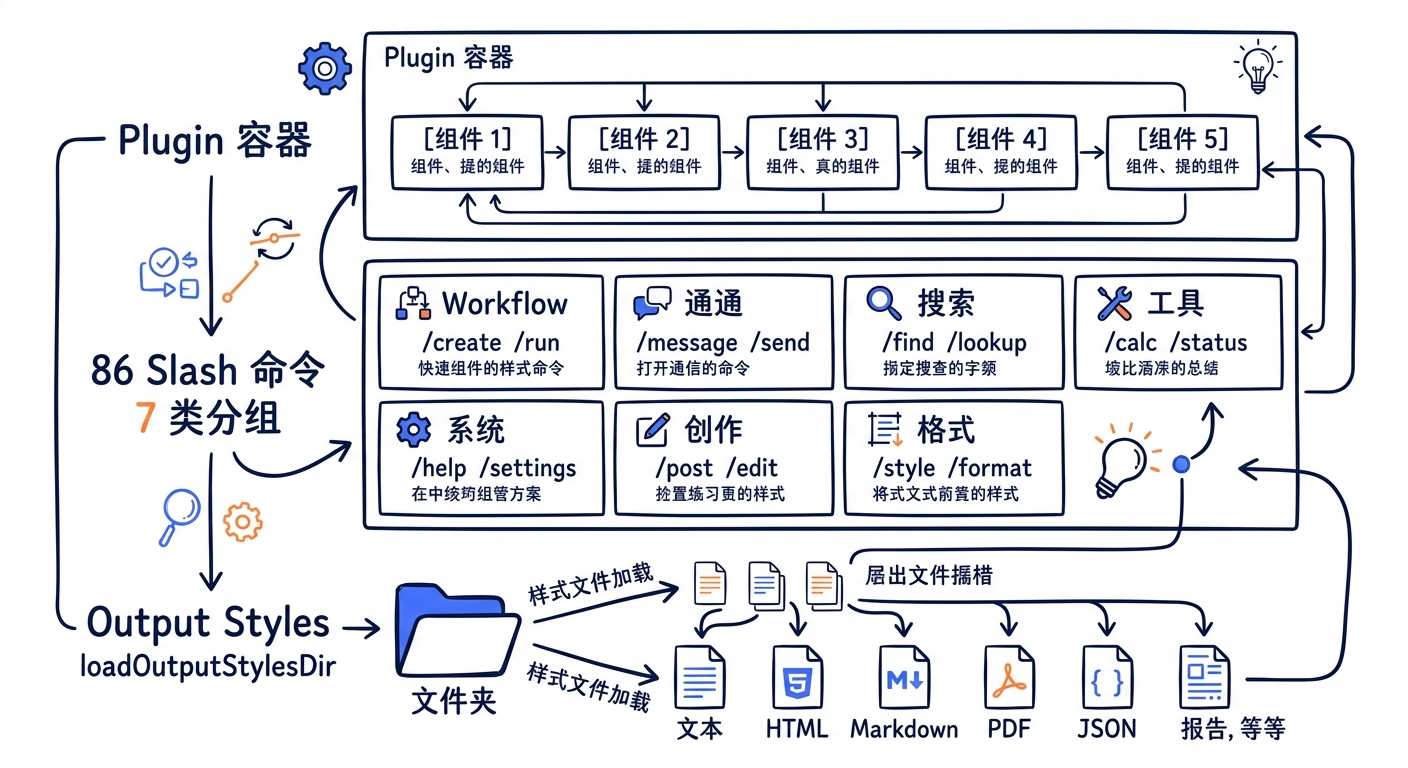
14.4.1 7 类分组速查表
| 类别 | 数量 | 代表命令 | 关键路径 |
|---|---|---|---|
| 会话与流程 | 18 | clear resume exit session share summary rewind |
src/commands/clear/、src/commands/resume/ |
| 配置与环境 | 12 | config env theme statusline output-style vim keybindings |
src/commands/config/、src/commands/output-style/ |
| 网络与远程 | 10 | bridge mobile desktop remote-env remote-setup teleport |
src/commands/bridge/、src/commands/teleport/ |
| 开发工作流 | 15 | commit branch diff pr_comments review autofix-pr |
src/commands/commit.ts、src/commands/review.ts |
| 调试与诊断 | 10 | debug-tool-call doctor perf-issue sandbox-toggle heapdump |
src/commands/doctor/、src/commands/debug-tool-call/ |
| 安装与认证 | 8 | install-github-app install-slack-app login logout oauth-refresh |
src/commands/login/、src/commands/install-github-app/ |
| 其他工具类 | 13 | model version plan plugin agents skills |
src/commands/plan/、src/commands/plugin/ |
| 合计 | 86 |
七类合计 86 个命令,与权威数字表一致。注意这是 v2.1.88 的快照——具体某个命令在不同 build target(如 USER_TYPE === 'ant' vs 外部用户、feature('VOICE_MODE') vs 否)下可能被裁掉,运行时实际可见的命令数因人而异。
14.4.2 命令的目录结构典型样貌
86 个命令在源码里有两种主要组织形式:
Form A:单文件命令(约 12 个)
直接在 src/commands/ 下一个 .ts 文件,如 commit.ts、review.ts、version.ts。适合不需要 React 组件的简单 prompt 命令或纯 local 命令。
Form B:目录命令(约 74 个)
一个子目录,至少包含 index.ts。复杂命令还会有更多文件:
src/commands/plugin/
├── index.tsx            # Command 对象导出
├── plugin.tsx           # 主 React 组件
├── parseArgs.ts         # 参数解析
├── usePagination.ts     # 自定义 hook
├── AddMarketplace.tsx
├── BrowseMarketplace.tsx
├── DiscoverPlugins.tsx
├── ManageMarketplaces.tsx
├── ManagePlugins.tsx
├── PluginErrors.tsx
├── PluginOptionsDialog.tsx
├── PluginOptionsFlow.tsx
├── PluginSettings.tsx
├── PluginTrustWarning.tsx
├── UnifiedInstalledCell.tsx
├── ValidatePlugin.tsx
├── pluginDetailsHelpers.tsx
└── ...
可以看到 /plugin 命令实际上是一个完整的 Ink 应用——18 个 tsx 文件分别对应不同的 UI 状态(添加 marketplace、浏览 plugin、解决冲突、信任警告等)。这种规模在 86 个命令里属于”复杂派”,但说明了一件事:Slash Command 不是简单的”prompt 拼接”,它可以承载完整的交互式 UI。
14.4.3 重点命令深读:/commit
/commit 是最简单也最常用的 prompt 类型命令,源码 src/commands/commit.ts 共 92 行。它的核心是 getPromptForCommand 把”动态拼接的 prompt”返回给模型:
// src/commands/commit.ts:6-10

const ALLOWED_TOOLS = [
  'Bash(git add:*)',
  'Bash(git status:*)',
  'Bash(git commit:*)',
]
注意这里的 allowedTools 模式——它不允许 git push、不允许 git rebase、不允许 git reset。/commit 命令只是”提交当前改动”,所以它通过白名单把模型的能力刚好限制到这一个动作。
主体逻辑在 getPromptContent() 里拼一段 markdown,里面用 !\…`` 反引号语法插入 git 命令的输出(这是 Claude Code 的”prompt 内嵌 shell”约定):
// src/commands/commit.ts:20-26

return `${prefix}## Context

- Current git status: !\`git status\`
- Current git diff (staged and unstaged changes): !\`git diff HEAD\`
- Current branch: !\`git branch --show-current\`
- Recent commits: !\`git log --oneline -10\`
!\
最后 getPromptForCommand 包了一层”自动放行”:
// src/commands/commit.ts:65-88

async getPromptForCommand(_args, context) {
  const promptContent = getPromptContent()
  const finalContent = await executeShellCommandsInPrompt(
    promptContent,
    {
      ...context,
      getAppState() {
        const appState = context.getAppState()
        return {
          ...appState,
          toolPermissionContext: {
            ...appState.toolPermissionContext,
            alwaysAllowRules: {
              ...appState.toolPermissionContext.alwaysAllowRules,
              command: ALLOWED_TOOLS,
            },
          },
        }
      },
    },
    '/commit',
  )

  return [{ type: 'text', text: finalContent }]
}
注意 alwaysAllowRules.command: ALLOWED_TOOLS —— 命令在执行期间临时放宽了权限白名单,让 git add/status/commit 不再触发交互式询问。这是 prompt 类命令的一个常见模式——”我知道我自己要让模型干什么,所以这些工具调用免询问”。
14.4.4 重点命令深读:/resume
/resume 命令负责”恢复之前的会话”,是最复杂的”local-jsx”类型命令之一。src/commands/resume/ 目录有近 20 个文件,核心是把已落盘的会话日志(~/.claude/projects/<project-hash>/<session>.jsonl)反序列化回内存,重建消息列表与工具调用上下文。
它在 src/commands.ts 里被声明为非内部命令(即外部用户也能用),但又被列入 INTERNAL_ONLY_COMMANDS 中的几个相关命令(如 share、summary、teleport)共用 ResumeEntrypoint 类型:
// src/types/command.ts:100-105

export type ResumeEntrypoint =
  | 'cli_flag'
  | 'slash_command_picker'
  | 'slash_command_session_id'
  | 'slash_command_title'
  | 'fork'
5 种入口对应 5 条恢复路径——CLI 的 --resume、用户在 /resume UI 里挑选、用户输入 session ID、用户输入会话标题、Fork sub-agent。每条路径有不同的解析逻辑,但最终都会汇入 LocalJSXCommandContext.resume():
// src/types/command.ts:93-98

resume?: (
  sessionId: UUID,
  log: LogOption,
  entrypoint: ResumeEntrypoint,
) => Promise<void>
/resume 是 Slash Command 系统中”承担最多状态恢复职责”的命令——它必须正确处理 messages 列表、工具状态、permissions、cost tracker、worktree 状态等多个 AppState 切片。
14.4.5 重点命令深读:/config 与懒加载模式
/config 是 local-jsx 类型命令的代表,打开 Ink TUI 让用户编辑 settings。它的 load: () => Promise<LocalJSXCommandModule> 字段是懒加载的关键——/config 用了重型组件(颜色选择器、键绑定编辑器),启动时全部 import 会拖慢冷启动。
类似模式在 86 个命令里很普遍。最极端的例子是 /insights:实际实现 src/commands/insights.ts 是 113KB / 3200 行,src/commands.ts:189-202 用一个 13 行的 lazy shim 完全隔离:
// insights.ts is 113KB (3200 lines, includes diffLines/html rendering). Lazy
// shim defers the heavy module until /insights is actually invoked.
const usageReport: Command = {
  type: 'prompt',
  name: 'insights',
  description: 'Generate a report analyzing your Claude Code sessions',
  contentLength: 0,
  progressMessage: 'analyzing your sessions',
  source: 'builtin',
  async getPromptForCommand(args, context) {
    const real = (await import('./commands/insights.js')).default
    if (real.type !== 'prompt') throw new Error('unreachable')
    return real.getPromptForCommand(args, context)
  },
}
import 只有在 getPromptForCommand 被调用时才发生。
14.4.6 重点命令深读:/permissions
/permissions 是配置类命令里逻辑最复杂的之一——它要展示 5 种用户可见权限模式(外加 2 种内部模式),让用户为每个 tool 设置 allow/deny/ask 策略,还要区分 user/project/local/managed 四个 scope。
源码位于 src/commands/permissions/,UI 由多个 React 组件构成。它的”展示规则”和”修改写入”是分离的——展示走 PermissionRulesEditor,写入走 updateSettingsForSource,确保任何修改都被路由到正确的 settings 文件。
14.4.7 重点命令深读:/bridge
/bridge 命令属于”网络与远程”类,它启动一个 Bridge mode(让一台机器作为远程控制目标)。注意它在 src/commands.ts:73-75 是 feature flag 控制的:
const bridge = feature('BRIDGE_MODE')
  ? require('./commands/bridge/index.js').default
  : null
只有 feature('BRIDGE_MODE') 为真时才注册。这是 86 个命令中”非全员可见”的典型——它们写在源码里,但运行时是否激活取决于 feature flag、auth state、provider 类型。
14.4.8 重点命令深读:/teleport
/teleport 是”会话漂移”命令——把当前会话从一台机器搬到另一台。src/commands/teleport/ 目录下有 bridge.tsx 和 index.ts 两个文件,它依赖 Bridge 子系统进行 cross-device 状态同步。
它和 /share /summary 一起被列入 INTERNAL_ONLY_COMMANDS(src/commands.ts:243-247)——这意味着外部用户构建里这些命令会被裁掉。这种”内部命令”的存在,让 Anthropic 团队可以在不影响外部用户体验的前提下,往主分支推自己专用的工具。
14.4.9 重点命令深读:/debug-tool-call
/debug-tool-call 是诊断类的瑞士军刀——它打印工具调用的完整请求/响应,包括 Schema 验证错误、Permission 检查决策、Tool.call() 实际接收到的参数。位于 src/commands/debug-tool-call/。
调试场景里它的核心价值是:当模型说”我调用了某个工具但失败了”,开发者用 /debug-tool-call 可以精确定位是 Schema 问题、Permission 问题还是 Tool 实现问题。
14.4.10 命令分类的设计观察
7 类分组不是源码里写死的,是教学口径反映命令”用途”的功能维度。源码本身只在 src/commands.ts 用一个大 COMMANDS 数组按字母序展开。但分组揭示了 Slash Command 系统的”使用面”——会话与流程占比最大(18),第二是开发工作流(15)。这种分布跟”40 个工具”的分布形成有趣对比:工具更偏”模型用”,命令更偏”用户用”。
14.5 Slash Command 类型抽象:Command 接口
86 个命令外加 plugin 提供的若干命令,外加 6 种来源的 skill 命令,最终都汇集到一个 Command 联合类型上。理解这个类型系统是理解整个扩展体系的钥匙。
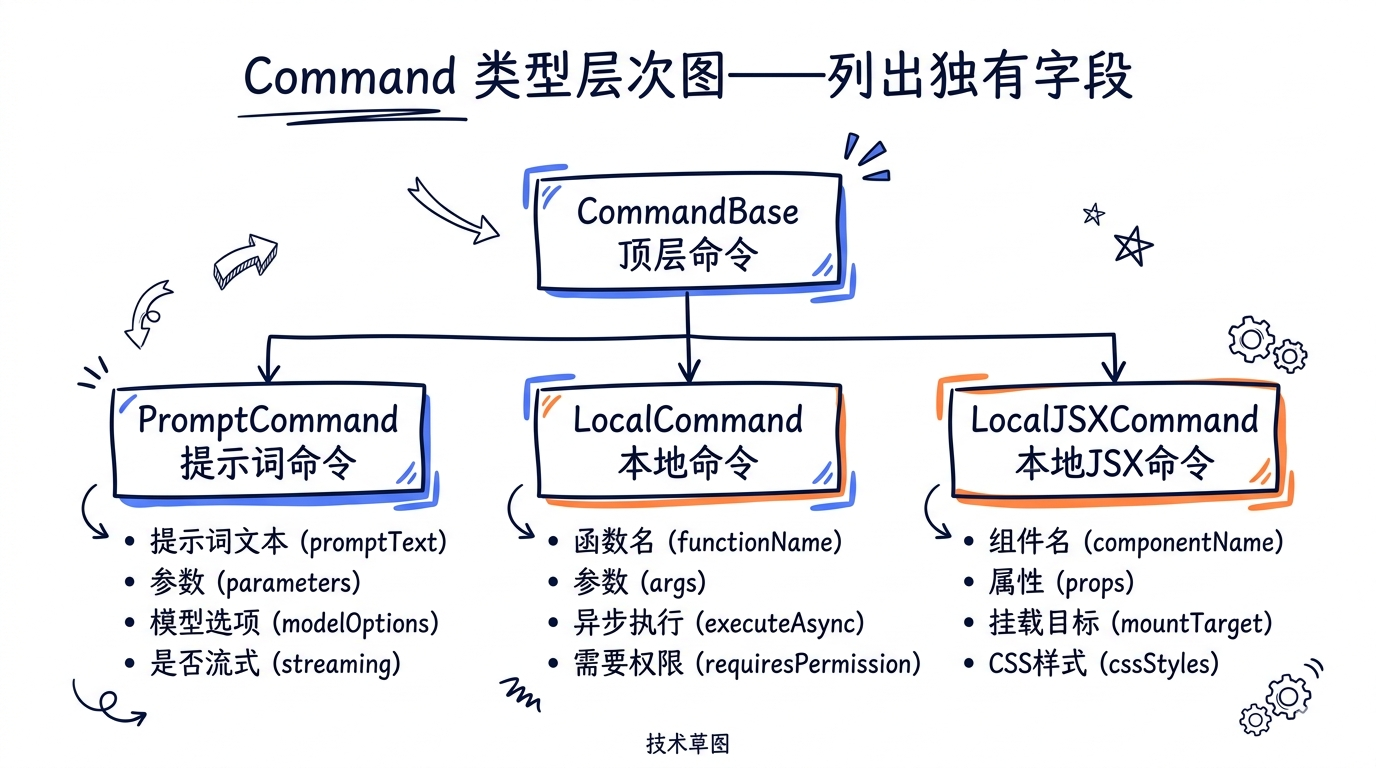
14.5.1 三种 Command 子类型
src/types/command.ts 把 Command 分为三种:
// src/types/command.ts (按代码顺序简化)

export type Command =
  | (PromptCommand & CommandBase)
  | (LocalCommand & CommandBase)
  | (LocalJSXCommand & CommandBase)
三类的区别:
| 类型 | 行为 | 典型命令 |
|---|---|---|
prompt |
展开为文本 prompt 发给模型 | /commit、/review、/init、所有 skill |
local |
在本地执行返回文本(不发模型) | /version、/exit、/clear、/cost |
local-jsx |
在本地渲染交互式 Ink UI | /config、/permissions、/plugin、/resume |
这个三分法有清晰的语义边界:
prompt命令的核心是”准备一段文本上下文”。命令本身不调工具——是模型读取这段文本后再决定要不要调工具。local命令的核心是”算个值”。它在本地计算结果并返回字符串,整个交互不经过模型。local-jsx命令的核心是”打开 UI”。它启动一个交互式 Ink 组件,用户在 UI 里完成配置后退出。
14.5.2 PromptCommand 详细类型
最常见的 PromptCommand 类型 src/types/command.ts:25-57 完整定义:
export type PromptCommand = {
  type: 'prompt'
  progressMessage: string
  contentLength: number // Length of command content in characters (used for token estimation)
  argNames?: string[]
  allowedTools?: string[]
  model?: string
  source: SettingSource | 'builtin' | 'mcp' | 'plugin' | 'bundled'
  pluginInfo?: {
    pluginManifest: PluginManifest
    repository: string
  }
  disableNonInteractive?: boolean
  // Hooks to register when this skill is invoked
  hooks?: HooksSettings
  // Base directory for skill resources (used to set CLAUDE_PLUGIN_ROOT environment variable for skill hooks)
  skillRoot?: string
  // Execution context: 'inline' (default) or 'fork' (run as sub-agent)
  // 'inline' = skill content expands into the current conversation
  // 'fork' = skill runs in a sub-agent with separate context and token budget
  context?: 'inline' | 'fork'
  // Agent type to use when forked (e.g., 'Bash', 'general-purpose')
  // Only applicable when context is 'fork'
  agent?: string
  effort?: EffortValue
  // Glob patterns for file paths this skill applies to
  // When set, the skill is only visible after the model touches matching files
  paths?: string[]
  getPromptForCommand(
    args: string,
    context: ToolUseContext,
  ): Promise<ContentBlockParam[]>
}
12 个字段里有几个需要重点理解:
source:标记命令的”权限来源”——SettingSource(user/project/policy/local)+builtin+mcp+plugin+bundled。这个字段直接影响命令在 UI 中如何被标注(如(plugin)(bundled))。context: 'inline' | 'fork':两种执行模式。inline 把 skill 内容嵌进当前对话;fork 启动 sub-agent,给 skill 一个独立的 token budget 和工具集。这是 Skill 系统的”重量级 vs 轻量级”分水岭。paths:条件激活——只有当模型最近触碰了匹配 glob 的文件路径时,这个 skill 才会出现在 ToolSearch / SkillTool 的列表里。这避免了上下文里塞进 100 个无关 skill 的元数据。getPromptForCommand:返回ContentBlockParam[]——可以包含多个文本/图片块,不仅仅是字符串。这给了命令”返回结构化 prompt”的能力。
14.5.3 CommandBase 共享字段
src/types/command.ts:175-216 定义的 CommandBase 是三种 Command 共享的基础字段:
export type CommandBase = {
  availability?: CommandAvailability[]
  description: string
  hasUserSpecifiedDescription?: boolean
  isEnabled?: () => boolean
  isHidden?: boolean
  name: string
  aliases?: string[]
  isMcp?: boolean
  argumentHint?: string
  whenToUse?: string
  version?: string
  disableModelInvocation?: boolean
  userInvocable?: boolean
  loadedFrom?:
    | 'commands_DEPRECATED'
    | 'skills'
    | 'plugin'
    | 'managed'
    | 'bundled'
    | 'mcp'
  kind?: 'workflow'
  immediate?: boolean
  isSensitive?: boolean
}
13 个字段里几个关键点:
availability:命令对哪类用户可见。'claude-ai'表示 claude.ai 订阅用户可见,'console'表示直接 API key 用户可见。这是产品分层的硬性技术边界。isEnabled:运行时动态判断(不同于availability的静态判断)。常用于 feature flag 集成(如() => feature('VOICE_MODE'))。disableModelInvocationvsuserInvocable:两个独立的开关。前者管”模型能否通过 SkillTool 调”,后者管”用户能否在 REPL 输入/cmd调”。一个命令可以是仅模型可调(如内部 skill)或仅用户可调(如/exit)。loadedFrom:与 PromptCommand 的source互为补充——source反映”权限来源”(policy/user/project),loadedFrom反映”加载机制”(commands dir/skills dir/plugin/bundled/mcp)。两者维度不同但常被混用。isSensitive:敏感命令(如/login输入 token)的输入会从对话历史里被红 redacted,避免日志泄露凭证。
14.5.4 命令注册机制:COMMANDS 数组
86 个内置命令的”注册”实际上就是 src/commands.ts 里的一个大 import + 一个大数组:
// src/commands.ts:258-346

const COMMANDS = memoize((): Command[] => [
  addDir,
  advisor,
  agents,
  branch,
  btw,
  chrome,
  clear,
  // ... 大约 70 个命令
  ...(webCmd ? [webCmd] : []),
  ...(forkCmd ? [forkCmd] : []),
  ...(buddy ? [buddy] : []),
  // ... feature flag 控制的命令
  ...(process.env.USER_TYPE === 'ant' && !process.env.IS_DEMO
    ? INTERNAL_ONLY_COMMANDS
    : []),
])
注意三件事:
memoize:数组只构造一次。但回调内的feature()调用会因为 GrowthBook 的_CACHED_MAY_BE_STALE而读到当时的快照——所以 feature 的 hot-reload 需要清缓存。...(condition ? [cmd] : []):feature flag 与 USER_TYPE 控制的”可选命令”模式。这是 TS 里在数组字面量中插入条件项的标准写法。INTERNAL_ONLY_COMMANDS:这一组命令(commit、autofixPr、bughunter、teleport等)只在USER_TYPE === 'ant'且非 demo 时加入——内部团队特供。
14.5.5 命令查找:findCommand / hasCommand
用户输入 /foo 后,CLI 通过 src/commands.ts:688-697 的 findCommand 查找匹配:
export function findCommand(
  commandName: string,
  commands: Command[],
): Command | undefined {
  return commands.find(
    _ =>
      _.name === commandName ||
      getCommandName(_) === commandName ||
      _.aliases?.includes(commandName),
  )
}
三条匹配规则:
_.name === commandName:直接 name 匹配(如commit)getCommandName(_) === commandName:可能加了前缀的 name(如 plugin 命令是pluginName:commandName)_.aliases?.includes(commandName):alias 匹配(少数命令支持别名,如/c→/clear)
如果都没匹配上,返回 undefined。getCommand 在没匹配时直接抛 ReferenceError(带可用命令列表),这个错误会被 REPL 捕获并显示给用户。
14.5.6 命令的来源标注:formatDescriptionWithSource
UI 上显示命令时来源会被标注。src/commands.ts:728-754 的 formatDescriptionWithSource 根据 source 与 kind 字段拼出形如 (superpowers) Brainstorm features(plugin)、Verify (bundled)、My skill (user) 的标签。这种标注让用户在 typeahead 里能立刻区分”这是哪来的命令”——避免内置和自定义命令同名时的歧义。
14.6 Slash Command 命名约定与 namespace
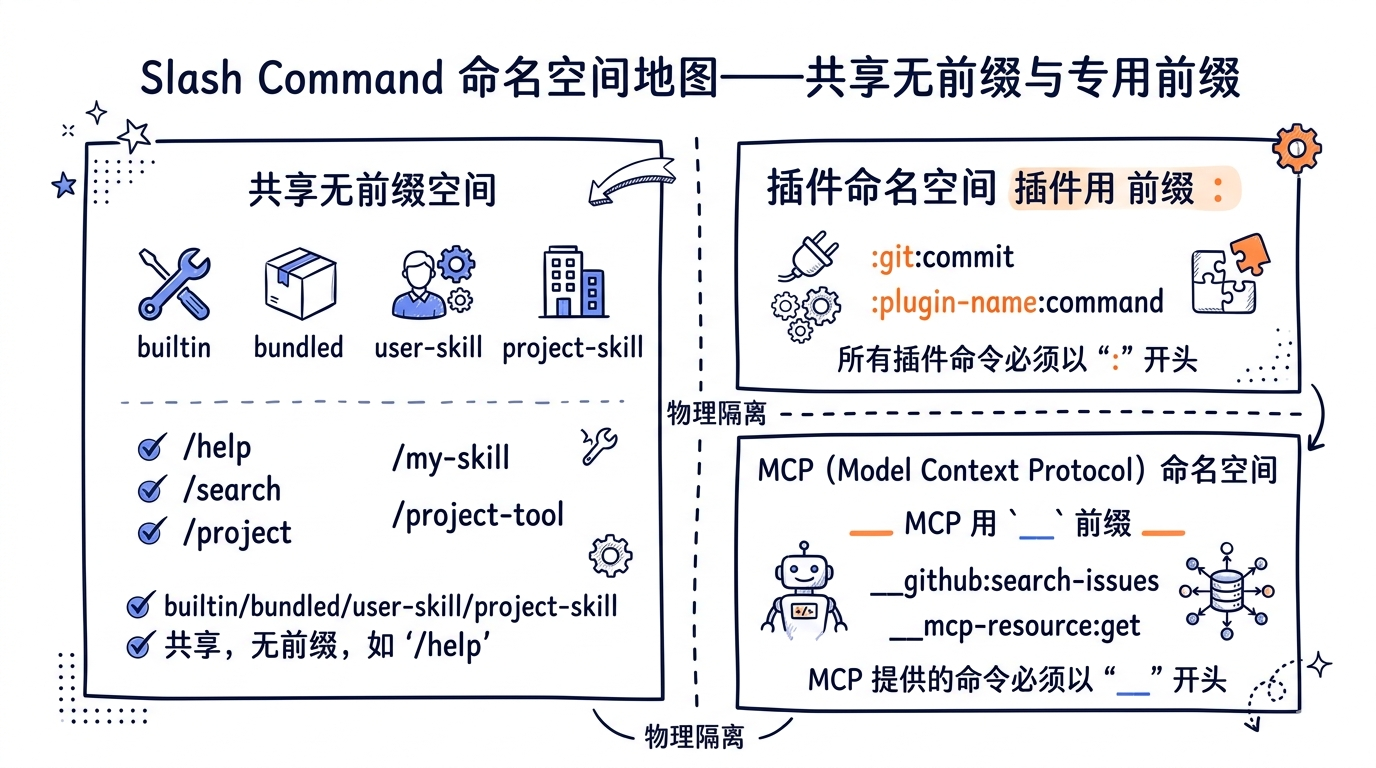
86 个内置命令外加 plugin 提供的命令外加 skill 命令,命名空间冲突几乎是必然的。Claude Code 的解决方案是namespace + 优先级。
14.6.1 命名规则:kebab-case
所有 slash command 名字必须是 kebab-case(小写字母 + 连字符)。这个约定在 schema 校验里被强制。
合法命名示例:
/commit
/auto-fix-pr
/install-github-app
/output-style
/debug-tool-call
非法命名示例:
/Commit          # 大写
/installGitHubApp # camelCase
/install_app     # 下划线
/install.app     # 句点
kebab-case 的好处是 URL-safe、文件名 friendly、读起来像短语。
14.6.2 Plugin namespace:pluginName:commandName
当 plugin 提供命令时,命令的最终调用名加上 plugin 前缀:
/superpowers:brainstorm
/gstack:browse
/figma:figma-code-connect
这个前缀通过冒号分隔,避免与 kebab-case 内的连字符混淆。在 src/types/command.ts 的 getCommandName() 函数里,逻辑大致是:
function getCommandName(cmd: Command): string {
  if (cmd.source === 'plugin' && cmd.pluginInfo) {
    return `${cmd.pluginInfo.pluginManifest.name}:${cmd.name}`
  }
  return cmd.name
}
这意味着同一个 plugin 内的命令不需要额外去重——它们天然被 namespace 隔离。两个不同 plugin 都提供 brainstorm 命令?没问题,分别变成 superpowers:brainstorm 和 other-plugin:brainstorm。
14.6.3 命名空间分配
完整的命名空间分配:
| 来源 | 命名空间 | 示例 |
|---|---|---|
| 内置 builtin | 无前缀 | /commit /clear /config |
| bundled skill | 无前缀 | /verify /debug /remember |
| user skill | 无前缀 | /my-skill |
| project skill | 无前缀 | /proj-skill |
| plugin command | <plugin>: 前缀 |
/superpowers:brainstorm |
| plugin skill | <plugin>: 前缀 |
/gstack:browse |
| MCP prompt | mcp__<server>__ 前缀 |
/mcp__filesystem__list |
可以看到 plugin 和 MCP 是仅有的两个”强制带前缀”的来源——它们的命令最容易冲突,所以系统直接用前缀做物理隔离。
而 builtin / bundled / user / project 之间共用”无前缀”空间,靠优先级和强制 dedupe 来解决冲突。
14.6.4 冲突解决:优先级
当两个命令同名(无前缀的),优先级规则在 src/commands.ts 的 loadAllCommands 顺序里隐式定义:
// src/commands.ts:449-468

const loadAllCommands = memoize(async (cwd: string): Promise<Command[]> => {
  const [
    { skillDirCommands, pluginSkills, bundledSkills, builtinPluginSkills },
    pluginCommands,
    workflowCommands,
  ] = await Promise.all([
    getSkills(cwd),
    getPluginCommands(),
    getWorkflowCommands ? getWorkflowCommands(cwd) : Promise.resolve([]),
  ])

  return [
    ...bundledSkills,
    ...builtinPluginSkills,
    ...skillDirCommands,
    ...workflowCommands,
    ...pluginCommands,
    ...pluginSkills,
    ...COMMANDS(),
  ]
})
合并顺序:
[bundled, builtinPlugin, skillDir, workflow, plugin, pluginSkill, COMMANDS]
findCommand 用 Array.find——它返回第一个匹配的。但这里的”第一个”取决于 typeahead/CLI 调用 findCommand 之前对数组做了什么排序。在大多数 UI 路径里,内置命令(COMMANDS)排在最后,但它们的 name 一定是不会和外部 skill 重合的(因为 skill 的 name 不太会取 commit、clear 这种)。
如果真的发生 “user skill 名叫 commit” 这种事,结果是 user skill 被列在前面,findCommand 先命中 skill。这是一个用户优先于内置的隐式规则——你确实可以”覆盖” /commit 的行为。但这个机制并不是为”覆盖”设计的,而是为”自定义”设计的——如果你写了一个 skill 叫 commit,行为就是你写的那样。
14.6.5 dynamic skill 的特殊插入位置
注意 getCommands 函数 src/commands.ts:493-516 里有一个特殊处理——动态发现的 skill(paths 字段触发)插入位置:
if (uniqueDynamicSkills.length === 0) {
  return baseCommands
}

// Insert dynamic skills after plugin skills but before built-in commands
const builtInNames = new Set(COMMANDS().map(c => c.name))
const insertIndex = baseCommands.findIndex(c => builtInNames.has(c.name))

if (insertIndex === -1) {
  return [...baseCommands, ...uniqueDynamicSkills]
}

return [
  ...baseCommands.slice(0, insertIndex),
  ...uniqueDynamicSkills,
  ...baseCommands.slice(insertIndex),
]
逻辑是:动态 skill 插入在”内置命令组开始之前”。这保证了动态 skill 的优先级高于内置命令,但低于显式声明的 skill/plugin。
14.6.6 alias 机制
少数命令通过 aliases 字段提供短名:
{
  name: 'help',
  aliases: ['?'],
  // ...
}
findCommand 会在 _.aliases?.includes(commandName) 这一步匹配上 alias。但注意 alias 不走 namespace——plugin 命令的 alias 不会自动加上 plugin 前缀。这意味着 plugin 提供 alias 必须自己确保不冲突。
实践中 alias 用得不多(86 个命令大部分没有),主要用于”硬编码的便利”(如 /? → /help)。
14.7 createMovedToPluginCommand 模式:内置命令迁移到 plugin
src/commands/createMovedToPluginCommand.ts 是一个 65 行的小文件,但它揭示了一个非常重要的演进机制——如何把内置命令优雅地迁移到 plugin。
14.7.1 问题背景
Claude Code 在演进过程中,会有这样的需求:某个内置命令(比如假设 /some-command)希望被剥离成单独的 plugin。原因可能是:
- 它的依赖(特定 SDK、外部 API、特殊工具)会让 CLI 主体膨胀。
- 它有专门的维护团队。
- 它需要更频繁的迭代,而 CLI 主体的发布节奏是固定的。
- 它属于实验性功能,不希望污染稳定主体。
但直接删除内置命令会破坏向后兼容——已经习惯了 /some-command 的用户突然找不到它,会迷茫。
14.7.2 解决方案:占位 + 提示
createMovedToPluginCommand 的方案是:保留命令名,但替换实现为”提示用户去装 plugin”的占位。
完整源码 src/commands/createMovedToPluginCommand.ts:22-65:
export function createMovedToPluginCommand({
  name,
  description,
  progressMessage,
  pluginName,
  pluginCommand,
  getPromptWhileMarketplaceIsPrivate,
}: Options): Command {
  return {
    type: 'prompt',
    name,
    description,
    progressMessage,
    contentLength: 0, // Dynamic content
    userFacingName() {
      return name
    },
    source: 'builtin',
    async getPromptForCommand(
      args: string,
      context: ToolUseContext,
    ): Promise<ContentBlockParam[]> {
      if (process.env.USER_TYPE === 'ant') {
        return [
          {
            type: 'text',
            text: `This command has been moved to a plugin. Tell the user:

1. To install the plugin, run:
   claude plugin install ${pluginName}@claude-code-marketplace

2. After installation, use /${pluginName}:${pluginCommand} to run this command

3. For more information, see: https://github.com/anthropics/claude-code-marketplace/blob/main/${pluginName}/README.md

Do not attempt to run the command. Simply inform the user about the plugin installation.`,
          },
        ]
      }

      return getPromptWhileMarketplaceIsPrivate(args, context)
    },
  }
}
这个工厂函数返回一个 PromptCommand,但它的 getPromptForCommand 不做任何实际工作——它返回一段告诉模型”通知用户装 plugin”的文本。
14.7.3 双重路径设计
注意 getPromptForCommand 内部有两条路径:
USER_TYPE === 'ant':内部用户(marketplace 已经对他们开放),直接返回”装 plugin”的提示文本。- 外部用户:调用
getPromptWhileMarketplaceIsPrivate——这是一个回退实现,让命令在 marketplace 还没公开时仍然能工作。
这是一个非常巧妙的过渡设计。配合 Options 类型 src/commands/createMovedToPluginCommand.ts:5-20 的注释看:
/**
 * The prompt to use while the marketplace is private.
 * External users will get this prompt. Once the marketplace is public,
 * this parameter and the fallback logic can be removed.
 */
getPromptWhileMarketplaceIsPrivate: (
  args: string,
  context: ToolUseContext,
) => Promise<ContentBlockParam[]>
注释明确说:”等 marketplace 公开后,这个参数和 fallback 逻辑就可以删除了。”——这是一段标记好”未来可清理”的代码,迁移完成后删除非常清晰。
14.7.4 三阶段迁移路径
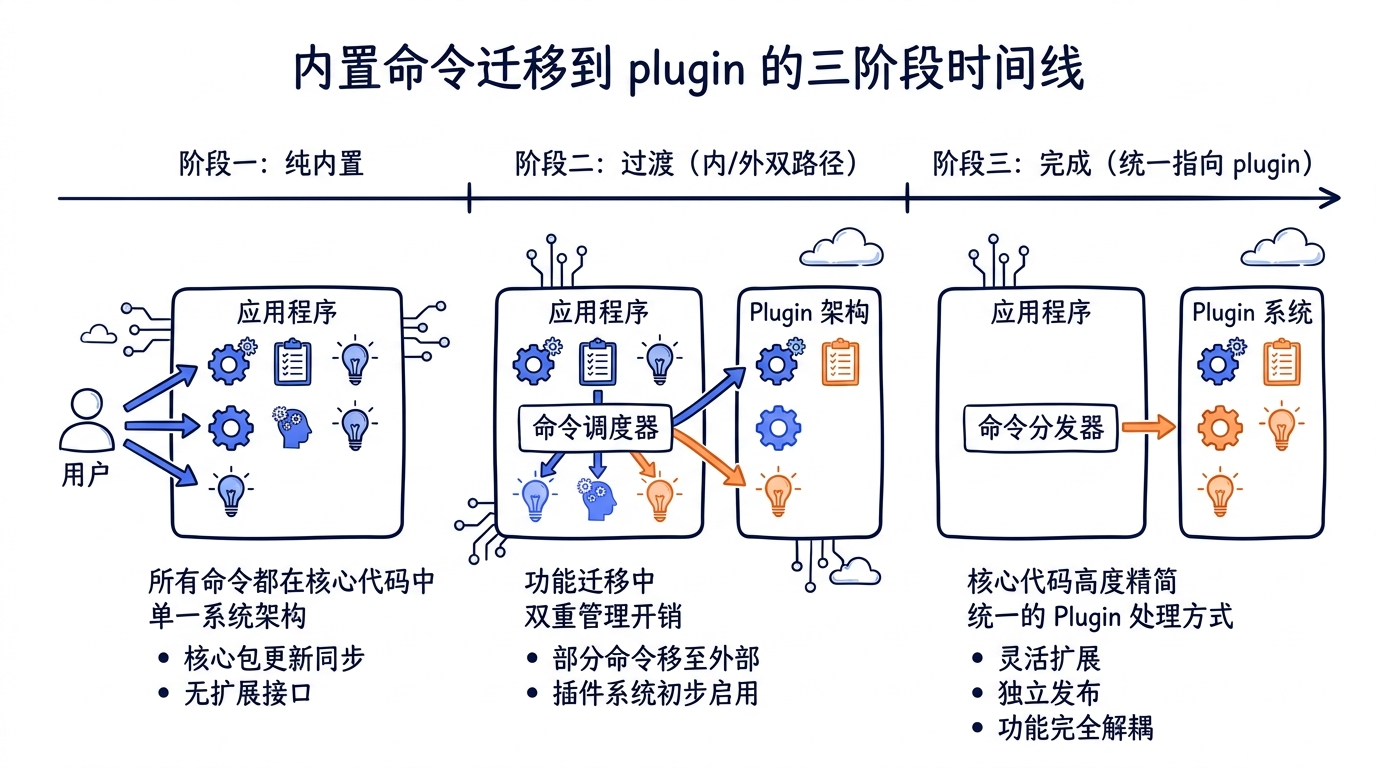
createMovedToPluginCommand 实现了一个三阶段迁移:
阶段 1:纯内置 → 阶段 2:过渡(内部走 marketplace,外部走 fallback)
       → 阶段 3:完成(统一指向 plugin,删除 fallback)→ 阶段 4:可选移除占位
每一步都向后兼容,不会让任何用户突然遭遇 “command not found”。
14.7.5 消息内容的精心设计
提示文本的三个设计要点:明确的安装命令(用户复制即可)、指明新调用名 /<plugin>:<command>、文档链接。最后一句 Do not attempt to run the command. Simply inform the user about the plugin installation. 是给模型看的指令,避免模型自作主张去 fallback 执行。
14.7.6 与 deprecation 模式的对比
createMovedToPluginCommand 与传统的 deprecation 模式有几点不同:
| 维度 | 传统 deprecation | createMovedToPluginCommand |
|---|---|---|
| 命令是否还能用 | 还能用,但有警告 | 不直接执行,转为安装提示 |
| 用户行动 | 不改也行(暂时) | 必须装 plugin 才能继续 |
| 时间窗口 | 长期保留 + 警告 | 短期过渡 + 完全移除 |
| 代码代价 | 永久保留旧实现 | 仅保留占位(几十行) |
迁移到 plugin 的设计选择了激进——一旦切换,旧实现整个删掉,主体瘦身。这是 Plugin 系统的核心价值之一:让主体可以保持精简,复杂功能外挂。
14.8 Output Styles 系统
Output Style 是 Claude Code 第三类”用户可定制行为”——它的作用域比 Skill 更窄、比 Plugin 更专——专门控制模型回复的呈现风格。
14.8.1 Output Style 是什么
Output Style 不影响模型决策、不影响工具调用,只影响输出怎么”长样”。具体说,它会影响:
- Markdown 渲染风格(紧凑 vs 详尽)
- 代码块样式(带行号 vs 不带)
- 列表风格(编号 vs bullet 点)
- 标题层次的展开程度
- 表情/emoji 使用频率
- 某些特定语境的语气(专业 vs 轻松)
形式上,Output Style 是一个 Markdown 文件,frontmatter 声明 name + description,正文是”风格指令 prompt”。这段 prompt 会在每次模型调用时拼接到 system prompt 里,约束模型的输出格式。
典型的 output-style 文件结构:
~/.claude/output-styles/
└── concise.md
concise.md 内容(示意):
---
name: concise
description: 极简风格——直接给答案
keep-coding-instructions: true
---

# 极简风格

输出请遵守:
- 一句话能说清楚的不要分段
- 代码用最少的注释
- 不要总结自己说过的内容
- 删掉所有"让我..."这样的过程描述
14.8.2 加载机制:loadOutputStylesDir
源码 src/outputStyles/loadOutputStylesDir.ts 整个文件 98 行,核心是 getOutputStyleDirStyles()——一个 memoize 的异步函数。完整实现:
// src/outputStyles/loadOutputStylesDir.ts:26-92

export const getOutputStyleDirStyles = memoize(
  async (cwd: string): Promise<OutputStyleConfig[]> => {
    try {
      const markdownFiles = await loadMarkdownFilesForSubdir(
        'output-styles',
        cwd,
      )

      const styles = markdownFiles
        .map(({ filePath, frontmatter, content, source }) => {
          try {
            const fileName = basename(filePath)
            const styleName = fileName.replace(/\.md$/, '')

            // Get style configuration from frontmatter
            const name = (frontmatter['name'] || styleName) as string
            const description =
              coerceDescriptionToString(
                frontmatter['description'],
                styleName,
              ) ??
              extractDescriptionFromMarkdown(
                content,
                `Custom ${styleName} output style`,
              )

            // Parse keep-coding-instructions flag (supports both boolean and string values)
            const keepCodingInstructionsRaw =
              frontmatter['keep-coding-instructions']
            const keepCodingInstructions =
              keepCodingInstructionsRaw === true ||
              keepCodingInstructionsRaw === 'true'
                ? true
                : keepCodingInstructionsRaw === false ||
                    keepCodingInstructionsRaw === 'false'
                  ? false
                  : undefined

            // Warn if force-for-plugin is set on non-plugin output style
            if (frontmatter['force-for-plugin'] !== undefined) {
              logForDebugging(
                `Output style "${name}" has force-for-plugin set, but this option only applies to plugin output styles. Ignoring.`,
                { level: 'warn' },
              )
            }

            return {
              name,
              description,
              prompt: content.trim(),
              source,
              keepCodingInstructions,
            }
          } catch (error) {
            logError(error)
            return null
          }
        })
        .filter(style => style !== null)

      return styles
    } catch (error) {
      logError(error)
      return []
    }
  },
)
逻辑分三步:
loadMarkdownFilesForSubdir('output-styles', cwd):扫描所有output-styles/子目录(项目级 + 用户级),返回{filePath, frontmatter, content, source}[]。- map 转换:每个 markdown 文件转成一个
OutputStyleConfig对象。 - filter null:错误的样式被设为 null,最后过滤掉。
注意它对 keep-coding-instructions 的处理——支持 boolean 和字符串两种形式。这是一个常见的 frontmatter 容错设计——用户可能写 true 或 "true",都得 work。
14.8.3 三层来源与优先级
Output Style 来源覆盖了和 Skill 类似的层级:
| 层级 | 路径 | 优先级 |
|---|---|---|
| 项目级 | <project>/.claude/output-styles/*.md |
最高 |
| 用户级 | ~/.claude/output-styles/*.md |
中 |
| Plugin 级 | <plugin>/output-styles/*.md |
单独通道 |
src/outputStyles/loadOutputStylesDir.ts:11 的 import 体现了这一点:
import { clearPluginOutputStyleCache } from '../utils/plugins/loadPluginOutputStyles.js'
Plugin 提供的 output style 走 src/utils/plugins/loadPluginOutputStyles.ts 的独立加载路径,但缓存清理时一起清。这是为了让 /reload-plugins 既清掉 plugin output style 缓存,又清掉用户/项目级 cache:
// src/outputStyles/loadOutputStylesDir.ts:94-98

export function clearOutputStyleCaches(): void {
  getOutputStyleDirStyles.cache?.clear?.()
  loadMarkdownFilesForSubdir.cache?.clear?.()
  clearPluginOutputStyleCache()
}
14.8.4 OutputStyleConfig 类型
每个加载出来的 output style 是一个 OutputStyleConfig:
// 简化表示(来自 src/constants/outputStyles.ts)

type OutputStyleConfig = {
  name: string                    // UI 显示名
  description: string             // UI 描述
  prompt: string                  // 注入到 system prompt 的内容
  source: SettingSource           // 来源(user/project/plugin)
  keepCodingInstructions?: boolean // 是否保留 coding 默认指令
}
keepCodingInstructions 字段最值得讲——它决定是否在用户的 output style 之上叠加 Claude Code 的内置 coding 指令(如”代码必须遵守…“、”工具调用必须…“)。三种情况:
true或'true':保留默认 coding 指令 + 用户 prompt(叠加模式)false或'false':完全替换,只用用户 prompt(独占模式)undefined:使用默认行为(通常是 true,即叠加)
独占模式(false)非常激进——它会让 Claude 失去所有内置 coding 习惯。慎用。
14.8.5 与 Ink 渲染层的关系
注意 Output Style 影响的不是 Ink 的”渲染策略”,而是模型生成的 markdown 内容本身。它通过修改模型行为让输出”看起来不一样”,而不是改变 Claude Code 怎么显示输出。
这一点和 /theme 命令形成有趣对比:
| 维度 | Output Style | /theme |
|---|---|---|
| 影响层 | 模型生成内容(prompt 注入) | Ink 渲染颜色(终端层) |
| 持久化 | output-styles/*.md 文件 | settings.json 字段 |
| 范围 | 跨会话、跨 CLI 实例 | 跨会话、跨 CLI 实例 |
| 动态切换 | /output-style 命令 |
/theme 命令 |
两者完全独立,可以叠加使用——你可以同时用 dark 主题 + concise output style。
14.8.6 force-for-plugin 字段
第 65 行有一段警告日志:
if (frontmatter['force-for-plugin'] !== undefined) {
  logForDebugging(
    `Output style "${name}" has force-for-plugin set, but this option only applies to plugin output styles. Ignoring.`,
    { level: 'warn' },
  )
}
这是一个 Plugin 级 output style 才支持的字段。它的语义是”plugin 强制为它的 skill 应用这个 output style”——也就是说当用户调用某个 plugin 提供的 skill 时,自动切到 plugin 推荐的 output style。
但用户/项目级 output style 写这个字段没意义,所以会被忽略并打 warning。这种”字段误用警告”是源码中很常见的模式——容错但提示。
14.8.7 Output Style 的设计哲学
为什么要单独搞一个 Output Style 系统,而不是让用户写一个普通 Skill 来达到同样目的?
答案在于激活时机:
- Skill 是”按需触发”——模型决定何时激活、用户决定
/skill-name调用。 - Output Style 是”全局生效”——一旦启用,所有回复都受影响。
如果用 Skill 实现 output style 的效果,需要每次对话开头都调用一次 skill,且 skill 的指令容易被后续工具调用、消息追加给”冲淡”。Output Style 通过直接修改 system prompt,确保影响贯穿整个会话。
这就是为什么要把它做成独立系统——它的”挂载点”是 system prompt 本身,而不是 user prompt 流。
14.9 插件市场与官方注册中心
Plugin 系统的最后一块拼图是marketplace——plugin 怎么被发现、被分发、被信任。
14.9.1 Plugin Marketplace 的层次
Claude Code 的 plugin marketplace 不是一个集中式服务,而是一个多源声明机制。src/utils/plugins/marketplaceManager.ts:1-19 的注释把布局描述清楚了:
~/.claude/
  └── plugins/
      ├── known_marketplaces.json    # Configuration of all known marketplaces
      └── marketplaces/              # Cache directory for marketplace data
          ├── my-marketplace.json    # Cached marketplace from URL source
          └── github-marketplace/    # Cloned repository for GitHub source
              └── .claude-plugin/
                  └── marketplace.json
每个 marketplace 是一个 JSON 文件(或 git 仓库里的 JSON 文件),声明了”这个 marketplace 提供了哪些 plugin”。具体说:
{
  "name": "my-marketplace",
  "plugins": [
    {
      "name": "formatter",
      "description": "...",
      "source": {
        "type": "git",
        "url": "https://github.com/user/formatter-plugin",
        "branch": "main"
      },
      "version": "1.0.0"
    }
  ]
}
Plugin 不直接发布——它发布到一个 marketplace,用户安装 marketplace 后才能装这个 plugin。
14.9.2 marketplace 的四种 source 类型
marketplace 本身可以来自四种 source:
| Type | 形式 | 示例 |
|---|---|---|
| URL | 远程 JSON | https://example.com/marketplace.json |
| Git | 远程仓库 | https://github.com/anthropics/claude-code-marketplace |
| NPM | npm 包 | @anthropic/marketplace |
| Local | 本地路径 | /Users/me/my-marketplace.json |
Git source 是最常见的——marketplace 仓库根目录里放一个 .claude-plugin/marketplace.json,clone 下来就能用。
14.9.3 known_marketplaces.json:用户的 marketplace 注册表
用户安装 marketplace 后,配置写到 ~/.claude/plugins/known_marketplaces.json:
{
  "marketplaces": {
    "claude-code-marketplace": {
      "type": "git",
      "url": "https://github.com/anthropics/claude-code-marketplace",
      "branch": "main",
      "lastUpdated": "2026-04-30T...",
      "commitSha": "abc123..."
    }
  }
}
commitSha 字段是 plugin 系统的”版本钉死”机制——它记录上次成功 reconcile 时仓库的 HEAD SHA。下次启动时如果远端 SHA 没变,可以直接读缓存;变了就重新拉取。
14.9.4 plugin 的 ID:name@marketplace
前面 14.3.2 提过,plugin 的全局 ID 是 name@marketplace 形式。这个组合是唯一的:
formatter@claude-code-marketplace
brainstorm@superpowers
gstack@gstack-marketplace
@ 是分隔符,左边是 plugin name(marketplace 内唯一),右边是 marketplace name(全局唯一)。这种组合 ID 让两件事变得可能:
- 同名 plugin 来自不同 marketplace 不冲突:可以同时装
formatter@market-a和formatter@market-b。 - 统一的引用语法:用户在
/plugin install时直接 pasteformatter@market-a,系统就知道去哪个 marketplace 找。
14.9.5 Official Registry vs MCP Official Registry
Claude Code 引用了两个 “official registry”:
- Plugin Official Registry:
anthropics/claude-code-marketplace,存放官方维护的 plugin(bridge、agents-platform等如果迁移会落到这里)。 - MCP Official Registry:MCP 生态的官方 MCP server 列表,参见第十二章。
两者完全独立——Plugin Marketplace 不知道 MCP Registry 的存在,反之亦然。它们的关系是:
- 一个 plugin 可以在
plugin.json#mcpServers里嵌入 MCP server 配置(如内嵌一个 Slack MCP)。 - 一个 MCP server 可以通过 plugin 分发(用户装一个 plugin 就自动连上某 MCP server)。
但 plugin marketplace 本身不充当 MCP 注册中心——它只是 plugin 的注册中心,附带能携带 MCP 配置的能力。
14.9.6 信任与下架机制
Plugin 的”信任”在两个层面:
- PluginTrustWarning:用户首次启用某 plugin 时,UI 会弹一个 warning,要求用户确认信任来源。源码
src/commands/plugin/PluginTrustWarning.tsx。 - Blocklist:官方维护的下架列表。
src/utils/plugins/pluginBlocklist.ts的detectAndUninstallDelistedPlugins()在每次启动时检查——如果某 plugin 被加入 blocklist,自动卸载并标记 flag 给用户。
useManagePlugins.ts:56-68 调用了这个机制:
// Detect delisted plugins, auto-uninstall them, and record as flagged.
await detectAndUninstallDelistedPlugins()

// Notify if there are flagged plugins pending dismissal
const flagged = getFlaggedPlugins()
if (Object.keys(flagged).length > 0) {
  addNotification({
    key: 'plugin-delisted-flagged',
    text: 'Plugins flagged. Check /plugins',
    color: 'warning',
    priority: 'high',
  })
}
这是一个防恶意软件机制——如果某 plugin 被发现做坏事(窃取凭证、破坏文件等),Anthropic 把它加入 blocklist,所有用户的 Claude Code 在启动时静默卸载,并通过 notification 提醒。
14.9.7 plugin policy(企业管控)
企业用户可以通过 managed settings 管控 plugin 行为:
- 必装清单:某些 plugin 必须装、不能禁用。
- 黑名单:某些 plugin 完全禁止安装。
- marketplace 限制:只能从特定 marketplace 安装。
源码 src/utils/plugins/pluginPolicy.ts 实现这一逻辑。它在启动时被 loadAllPlugins 调用,把企业策略转换为 plugin scope 的过滤器。
14.9.8 marketplace UI
src/commands/plugin/ 提供完整的 marketplace UI:
| 组件 | 用途 |
|---|---|
BrowseMarketplace.tsx |
浏览已安装的 marketplace 内的所有 plugin |
AddMarketplace.tsx |
添加新的 marketplace |
ManageMarketplaces.tsx |
查看/删除/更新已有 marketplace |
DiscoverPlugins.tsx |
发现推荐 plugin |
PluginSettings.tsx |
配置某个 plugin 的运行参数 |
PluginOptionsDialog.tsx |
plugin 自定义配置弹窗 |
PluginErrors.tsx |
显示 plugin 加载错误 |
ValidatePlugin.tsx |
验证 plugin 完整性 |
注意 PluginSettings.tsx——plugin 自身可以接受配置(比如某个 LLM-based plugin 需要一个 API endpoint)。这些配置存在 LoadedPlugin.settings 里,在 plugin 调用时通过环境变量传给 hooks/commands。
14.10 Skills、Plugins、Commands 三系协作
到这里我们已经分别讲清楚了 Skill(第十三章)、Plugin(14.1-14.3)、Slash Command(14.4-14.7),以及 Output Style(14.8)和 Marketplace(14.9)。最后这一节我们用一个全景视角,把三系的协作关系钉死。
14.10.1 三系一图:组件流向
   ┌──────────────────────────────────────────────────────────────────┐
   │                        Plugin (容器/分发)                         │
   │  ┌──────────┬──────────┬──────────┬──────────┬─────────────────┐ │
   │  │ commands/│  agents/ │  skills/ │  hooks/  │ output-styles/  │ │
   │  │  *.md    │   *.md   │   *.md   │ hooks.json│      *.md       │ │
   │  └──────────┴──────────┴──────────┴──────────┴─────────────────┘ │
   │  + plugin.json#mcpServers (内嵌 MCP server 配置)                  │
   └──────────────────────────────────────────────────────────────────┘
          │            │            │           │           │
          ▼            ▼            ▼           ▼           ▼
   ┌──────────┐  ┌──────────┐  ┌──────────┐ ┌──────┐  ┌──────────────┐
   │ Slash    │  │ Sub-agent│  │  Skill   │ │ Hook │  │ Output Style │
   │ Command  │  │ Registry │  │ Registry │ │ Sys  │  │   Registry   │
   │ Registry │  │          │  │          │ │      │  │              │
   └──────────┘  └──────────┘  └──────────┘ └──────┘  └──────────────┘
        │             │             │           │           │
        └─────────────┴─────────────┴───────────┴───────────┘
                              │
                              ▼
                    ┌─────────────────┐
                    │  AppState       │
                    │  (运行时单例)     │
                    └─────────────────┘
要点:
- Plugin 不是运行时实体——它的内容在 load 时分裂到 5 个子系统的 registry。运行时去查”plugin”基本上是查 5 个 registry 的并集。
- 5 个 registry 同时被多种来源 contribute——内置 + plugin + user/project skill dir + MCP server prompt + bundled。
- AppState 是统一前端——所有 UI、命令查找、skill index 都从 AppState 拿数据,而 AppState 是 5 个 registry 的整合视图。
14.10.2 三系定位对比表
再用一张表把三系定位拍死:
| 维度 | Skill | Plugin | Slash Command |
|---|---|---|---|
| 是什么 | 一段 markdown prompt | 一个组件容器 | 一个调用接口 |
| 物理形态 | SKILL.md 文件 |
目录 + plugin.json |
TS 模块 / commands/*.md |
| 来源数量 | 6 种(policy/user/project/bundled/commandDir/mcp) | 4 种 scope(user/project/local/managed) | 内置 + plugin + skill + mcp |
| 内置数量 | 17 个 bundled skill 文件(16 + 1 index) | 0 个内置(1 个装载入口) | 86 个内置命令 |
| 加载入口 | loadSkillsDir.ts |
pluginLoader.ts |
commands.ts 的 COMMANDS 数组 |
| 更新机制 | 文件变更(重启或 reload) | /reload-plugins |
重新启动 CLI |
| 用户主调用 | /skill-name |
/plugin(管理 UI) |
/cmd |
| 模型主调用 | SkillTool / ToolSearch | 不直接调用 | SkillTool(仅 prompt 类型) |
| 命名空间 | 无前缀 | 无(容器) | 内置无前缀 / plugin 用 : 前缀 |
这张表是后面遇到 “X 是 Skill 还是 Plugin?” 这种问题时的判别表。
14.10.3 加载顺序
完整的加载顺序(从启动到第一次 REPL prompt 出现):
1. CLI 启动 → bootstrap state
2. initBuiltinPlugins()                    // 注册 builtin plugin(目前空)
3. registerBundledSkill() x16              // 注册 17 个内置 skill 文件(含 index)
4. performBackgroundPluginInstallations()  // 后台 reconcile marketplace
5. useManagePlugins.initialPluginLoad()    // 加载所有 plugin
   ├── loadAllPlugins()                    // 扫盘
   ├── getPluginCommands()                 // → Command Registry
   ├── loadPluginAgents()                  // → Agent Registry
   ├── loadPluginHooks()                   // → Hook System
   ├── loadPluginMcpServers()              // → MCP Connection Manager
   └── loadPluginOutputStyles()            // → Output Style Registry
6. getCommands(cwd)                        // 整合所有 Command 来源
   └── loadAllCommands()
       ├── getSkills()                     // bundled + skillDir + plugin + builtinPlugin
       ├── getPluginCommands()             // plugin commands
       └── COMMANDS()                      // 86 个内置命令
7. AppState ready → REPL 渲染
注意几个微妙点:
- bundled skill 是同步注册(启动时立刻完成),plugin 的 skill 是异步加载(可能慢几百毫秒)。
- REPL 不等 plugin 装完就出现——用户已经能输入命令了,plugin 装好后通过 setAppState 推回 UI。
/reload-plugins跳过步骤 1-4,只重做 5-7——这是它快速生效的原因。
14.10.4 冲突处理矩阵
不同来源同名时的冲突处理:
| 冲突场景 | 解决策略 |
|---|---|
| 两个 plugin 提供同名 command | 各自带 <plugin>: 前缀,物理隔离 |
| user skill 与 project skill 同名 | project 优先(loadAllCommands 顺序) |
| user skill 与内置 command 同名 | user skill 优先(findCommand 数组顺序) |
| 两个 marketplace 同名 plugin | 各自带 @<marketplace> 后缀,物理隔离 |
| MCP prompt 与 skill 同名 | MCP 带 mcp__ 前缀,物理隔离 |
| bundled skill 与 user skill 同名 | user skill 排在前面(覆盖),bundled 进 fallback |
总结一句:plugin 与 MCP 用强制前缀解决冲突;user/project/bundled 用顺序优先级解决冲突。
14.10.5 何时用哪个:决策树
实际开发中”这个能力应该做成 Skill 还是 Plugin 还是 Command?”的决策可以走这个树:
新增能力?
├── 只是修改"模型怎么说话"
│   └── Output Style
│
├── 一段固定的 prompt 模板(无外部依赖)
│   ├── 只我自己用(个人项目)
│   │   └── ~/.claude/skills/<name>/SKILL.md
│   ├── 团队共享(项目内)
│   │   └── <project>/.claude/skills/<name>/SKILL.md
│   └── 开源给所有人
│       └── 做成 Plugin 发布到 marketplace
│
├── 需要执行 TS 代码(非纯 prompt)
│   ├── 内部使用(Anthropic 团队)
│   │   └── 加到 src/commands/ + 加入 INTERNAL_ONLY_COMMANDS
│   ├── 通用功能(外部用户也用)
│   │   └── 加到 src/commands/(如 /commit / /resume)
│   └── 第三方扩展
│       └── Plugin 提供 commands/*.md(不能写 TS,但可以包含 hooks 调外部脚本)
│
├── 需要外部进程(数据库、API)
│   └── 做成 MCP Server,可选地通过 Plugin 分发
│
├── 需要在生命周期事件触发(如 PreToolUse)
│   └── Hook(可单独写在 settings.json,也可由 Plugin 提供)
│
└── 多种东西的组合(Skill + Hook + MCP)
    └── Plugin(这是 Plugin 存在的本质场景)
这个决策树涵盖了 99% 的扩展场景。剩余 1% 是更专业的(如自定义 Output Style + 强制为 plugin 内 skill 应用——force-for-plugin)。
14.10.6 一个完整的 Plugin 例子
把所有部分拼起来,一个综合的 plugin 可能长这样:
my-fullstack-plugin/
├── plugin.json             # mcpServers: { db: { command: "node db-server.js" } }
├── commands/
│   ├── deploy.md           # /my-fullstack-plugin:deploy
│   └── rollback.md
├── agents/
│   └── reviewer.md
├── skills/frontend-tdd/SKILL.md   # /my-fullstack-plugin:frontend-tdd
├── hooks/hooks.json        # PreToolUse on Bash 安全检查
└── output-styles/ops-mode.md
安装后:用户能 /my-fullstack-plugin:deploy、模型能通过 SkillTool 调 frontend-tdd skill、Bash 调用前跑 PreToolUse hook、启动时连 db MCP server、用户可选 ops-mode output style。一个 plugin 一次性把”命令 + skill + hook + MCP server + output style”五件套全配齐——这就是 plugin 的最大价值。
14.10.7 三系协作的设计哲学小结
最后总结三个层次的协作哲学:
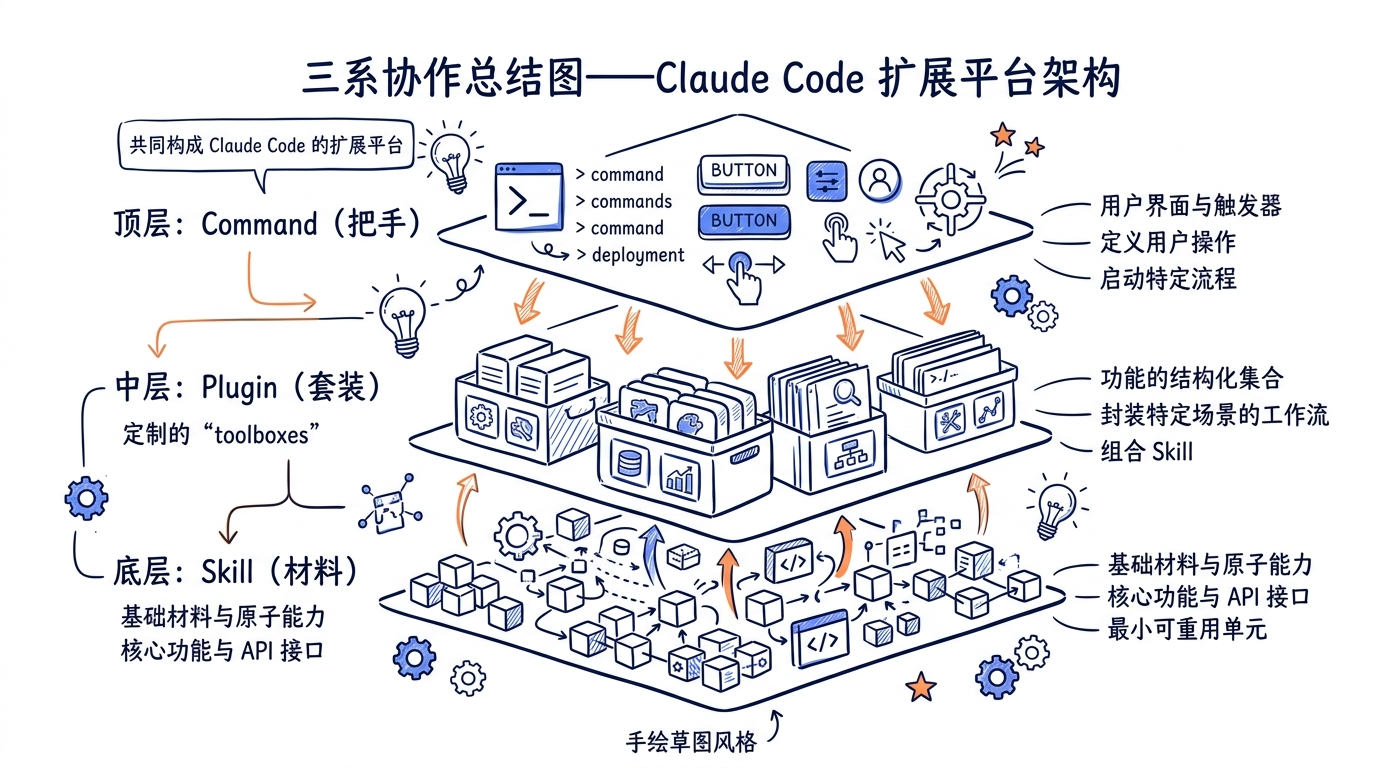
- Skill 是材料,Plugin 是套装,Command 是把手。Skill 提供原始能力,Plugin 把多个能力打包,Command 让用户和模型都能调用。
- 静态声明优先于运行时初始化。Plugin 没有”激活函数”——所有元数据通过 manifest + 子目录约定声明。这让 plugin 可以在不运行任何代码的前提下被分析、缓存、签名校验。
- 冲突用 namespace 解决,而不是版本号。Plugin 之间用
@marketplace隔离,命令之间用:plugin前缀,MCP 用mcp__前缀。这种命名空间的物理隔离比”版本号优先”更鲁棒——它让任意数量的 plugin 共存而不需要全局协调。
第十二章讲了 MCP(怎么接 5 大原语)、第十三章讲了 Skill(怎么注入 prompt)、本章讲了 Plugin/Command/OutputStyle(怎么打包分发)。三章合起来构成了 Claude Code “扩展平台”的完整图景。
动手实践
实践 1:实现一个最简 Plugin
目标:写一个本地 plugin,提供 1 个命令、1 个 skill、1 个 output style,验证三系协作。
步骤 1:创建 plugin 目录
mkdir -p ~/my-test-plugin/commands
mkdir -p ~/my-test-plugin/skills
mkdir -p ~/my-test-plugin/output-styles
步骤 2:写 plugin.json
{
  "name": "my-test-plugin",
  "version": "0.1.0",
  "description": "My first plugin",
  "commands": "commands",
  "skills": "skills",
  "outputStyles": "output-styles"
}
步骤 3:写一个命令 commands/hello.md
---
description: 打招呼并展示 plugin 工作
allowed-tools: ["Bash"]
---

请用 echo 打印 "Hello from my-test-plugin!",然后用一句话告诉用户当前目录。
步骤 4:写一个 skill skills/clean-formatter/SKILL.md
---
description: 把代码格式化成最简洁形式
when_to_use: 当用户要求清理代码冗余时
---

阅读用户提供的代码,删除:
- 多余的注释
- 空函数
- 未使用的 import
返回干净的版本。
步骤 5:写一个 output style output-styles/no-fluff.md
---
name: no-fluff
description: 没有废话的输出风格
keep-coding-instructions: true
---

输出请遵守:
- 不要"让我..."这样的过程描述
- 直接给答案
- 不要总结
步骤 6:用 --plugin-dir 加载
claude --plugin-dir ~/my-test-plugin
进入 REPL 后试:
/my-test-plugin:hello—— 触发命令- 让模型主动调用
clean-formatterskill(可问”帮我清理这段代码:…“) /output-style选no-fluff,然后看后续回复风格变化
成功标志:三种东西都能工作,且 /reload-plugins 后修改的 markdown 立刻生效。
实践 2:列出当前会话所有可用 Slash Commands
目标:写一个 shell 脚本,扫描 Claude Code 二进制,列出当前可用命令的总数与分类。
# 进入 REPL
claude
# REPL 内输入
/help
/help 命令会列出所有可见命令。但它的输出经过了过滤(隐藏 isHidden: true、当前 auth 不匹配 availability 的、feature flag off 的)。
进一步用 /skills 命令对比——它只列 prompt 类型的 skill,可以看到 bundled / user / project / plugin 的分类。
数一下:
内置可见命令:约 60-70 个(取决于 USER_TYPE / feature flag)
bundled skill:16 个(17 文件减 1 个 index)
你装的 plugin:M 个 plugin,N 个命令
总计可见:60 + 16 + N
实践 3:观察 Plugin 生命周期
# 1. 看看现在装了哪些 plugin
ls ~/.claude/plugins/installed/

# 2. 观察 known_marketplaces
cat ~/.claude/plugins/known_marketplaces.json | jq

# 3. 在 REPL 内 /plugin 进入管理 UI,禁用某个 plugin
# 然后 /reload-plugins,观察输出:
# Reloaded: 5 plugins · 12 skills · 3 agents · 2 hooks · 1 plugin MCP server
每次 /reload-plugins 输出会变化,反映了实时的 5 类组件计数。
源码对照表
本章引用的关键源码路径速查:
| 主题 | 文件 | 核心内容 |
|---|---|---|
| Plugin 装载入口 | src/plugins/bundled/index.ts |
initBuiltinPlugins() 空壳,注册槽位 |
| Builtin Plugin 注册表 | src/plugins/builtinPlugins.ts |
BUILTIN_PLUGINS Map、registerBuiltinPlugin() |
| Plugin 类型定义 | src/types/plugin.ts |
BuiltinPluginDefinition / LoadedPlugin / PluginError |
| Plugin 加载器 | src/utils/plugins/pluginLoader.ts |
loadAllPlugins() 主入口 |
| Plugin 安装管理 | src/services/plugins/PluginInstallationManager.ts |
performBackgroundPluginInstallations() |
| Plugin 操作 | src/services/plugins/pluginOperations.ts |
install / uninstall / enable / disable |
| Plugin CLI 子命令 | src/services/plugins/pluginCliCommands.ts |
claude plugin 系列子命令 |
| Plugin 管理 hook | src/hooks/useManagePlugins.ts |
React hook 把 LoadedPlugin 注入 AppState |
| Plugin 刷新 | src/utils/plugins/refresh.ts |
refreshActivePlugins() 全量替换 |
| Marketplace 管理 | src/utils/plugins/marketplaceManager.ts |
known_marketplaces.json 操作 |
| Marketplace 协调器 | src/utils/plugins/reconciler.ts |
reconcileMarketplaces() |
| Plugin Blocklist | src/utils/plugins/pluginBlocklist.ts |
detectAndUninstallDelistedPlugins() |
| Plugin 信任策略 | src/utils/plugins/pluginPolicy.ts |
企业管控 |
| Plugin 输出样式加载 | src/utils/plugins/loadPluginOutputStyles.ts |
plugin 级 output style |
| Plugin Schema | src/utils/plugins/schemas.ts |
manifest 的 zod schema |
| Slash Command 总入口 | src/commands.ts |
86 命令的 import + COMMANDS 数组 |
| Command 类型定义 | src/types/command.ts |
PromptCommand / LocalCommand / LocalJSXCommand / CommandBase |
/commit 命令 |
src/commands/commit.ts |
92 行的 prompt 类命令样板 |
/review 命令 |
src/commands/review.ts |
短 prompt 命令 |
/security-review 命令 |
src/commands/security-review.ts |
安全审查 prompt |
/resume 命令 |
src/commands/resume/ |
复杂 local-jsx 命令样板 |
/config 命令 |
src/commands/config/ |
懒加载 local-jsx 命令样板 |
/plugin 命令 |
src/commands/plugin/ |
18 个 tsx 文件的 marketplace UI |
/permissions 命令 |
src/commands/permissions/ |
5 种权限模式编辑器 |
/reload-plugins 命令 |
src/commands/reload-plugins/reload-plugins.ts |
调用 refreshActivePlugins() |
| 迁移占位 | src/commands/createMovedToPluginCommand.ts |
内置 → plugin 三阶段迁移 |
| Output Style 加载 | src/outputStyles/loadOutputStylesDir.ts |
getOutputStyleDirStyles() 98 行 |
/output-style 命令 |
src/commands/output-style/output-style.tsx |
output style 切换 UI |
/skills 命令 |
src/commands/skills/skills.tsx |
skill 管理 UI |
数据:
- 86 个 Slash Commands:
src/commands/子目录数(v2.1.88) - 17 个 bundled skill 文件(16 个 skill + 1 个 index):
src/skills/bundled/*.ts - 0 个 bundled plugin + 1 个装载入口:
src/plugins/bundled/index.ts - 6 种 Skill 来源:参见第十三章 13.3
- 86 命令的 7 类教学分组:会话流程 18 / 配置环境 12 / 网络远程 10 / 开发工作流 15 / 调试诊断 10 / 安装认证 8 / 其他工具 13
本章小结
-
Plugin 是分发与协作单位,不是运行时实体。它的内容在加载时分裂到 5 个子系统(commands / agents / skills / hooks / mcp / output-styles)各自处理,运行时不存在”plugin 这个对象”。这种设计让 plugin 能以静态声明的方式被分析、缓存、签名校验。
-
86 个 Slash Commands 分三种类型:
prompt(展开为模型 prompt)、local(本地算值返回)、local-jsx(启动交互式 Ink UI)。所有命令通过Command联合类型统一抽象,注册在src/commands.ts的COMMANDS()memoize 数组里。 -
命名空间的物理隔离比版本号优先更鲁棒。Plugin 命令带
<plugin>:前缀,MCP prompt 带mcp__<server>__前缀,user/project/bundled 共享无前缀空间但用顺序优先级解决冲突。 -
createMovedToPluginCommand模式支持”内置命令 → plugin”的三阶段平滑迁移:纯内置 → 过渡(marketplace 私有时双路径) → 完成(统一指向 plugin)。这让主体可以保持精简,复杂功能外挂。 -
Output Style 是第三类用户可定制行为——它不是 Skill,不是 Plugin,作用域仅限”模型回复怎么排版”。它通过修改 system prompt 实现全局生效,与 Skill 的”按需触发”形成互补。
-
/reload-plugins是核心一致性保证——它清空所有 plugin 缓存并全量重新加载,避免半启用状态。命令本身只有 60 行,但触发的是整个 plugin 子系统的全量替换。 -
Skill / Plugin / Command 三系协作可以一句话总结:Skill 是材料,Plugin 是套装,Command 是把手。Skill 提供单条 prompt 模板,Plugin 把多个组件打包分发,Command 提供统一的用户/模型调用接口。理解了这三层,就理解了 Claude Code 从”内置工具”演进成”可扩展平台”的全部技术路径。
思考题
86 个 Slash 命令中你最高频用哪 5 个?为什么?
欢迎在评论区聊聊你的想法。
下一讲,我们换个角度看《终端 UI 与输入交互》。